 Baselines
 All documentation pages
Install & access
Baselines for Confluence Cloud installs from the Atlassian Marketplace and appears under Apps in your Confluence navigation. Before anyone can use it, a Confluence administrator gives groups their permissions in Baseline Configuration.
Install from the Marketplace
Open the listing
Go to the Baselines for Confluence Cloud Marketplace listing and choose Get it now or Try it free. Pick the Confluence site to install on and confirm.
Review the app permissions
Baselines asks to read and write Confluence content and to act on your behalf, so that it reads pages as the person using it and, when somebody chooses Republish, writes a new page. A Confluence administrator approves these on install. See Permissions.
Give your groups access
Baselines has four permissions of its own, given to Confluence groups in Baseline Configuration (Confluence settings, Apps). Until a group has at least one, Baselines tells everyone who opens it Baselines is not set up on this site yet. A Confluence administrator opens Baseline Configuration, chooses Edit and allows each permission for the groups that need it; the table shows Allowed or Denied for each.
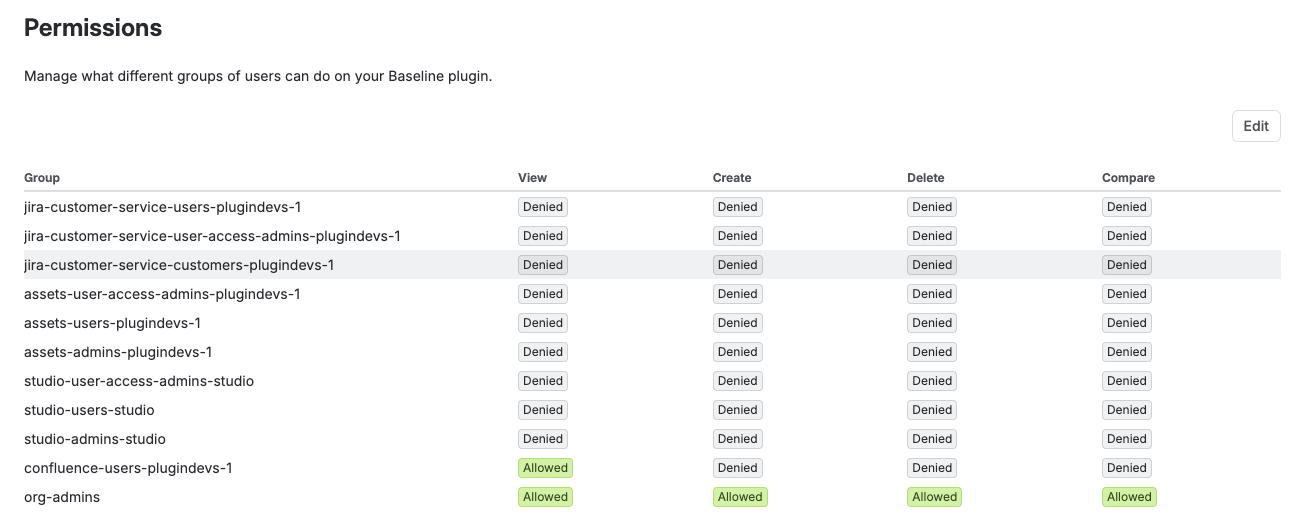
Baseline Configuration names the second permission Create. The new view calls the same permission Freeze, because Freeze is how a baseline is taken.
Open the app
Open Confluence → Apps → Baselines. Baselines opens on Documents. The first time a person opens it on a site that already has baselines, a screen shows how they were organised into documents and releases, and a short tour follows. See Classic view & tours.
If you do not see Baselines under Apps, expand the Apps section in the sidebar and look under Your apps. Administrators can also manage the app from Confluence settings → Manage apps.
Who can do what
| Permission | What it allows |
|---|---|
| View | See the documents, open a version, export it. |
| Freeze (Create) | Freeze documents and releases, republish, make schedules. |
| Compare | Compare two versions or two releases. |
| Delete | Delete versions and releases, put them back. |
Page content is always read as the person looking, so nobody reads the content of a page through Baselines that Confluence does not let them open. More in Permissions.
Was this page helpful? Yes · No · Contact support