 Baselines
 All documentation pages
Compare versions
Compare opens two versions of one document page by page: which pages were added, removed or changed, and in each changed page the words that changed.
Open Compare
- Compare on a row of Documents opens the document’s last two versions (a document with one version compares it with Today).
- Compare on a document’s page opens the pair its From and To rings pick.
- Compare with a version on a release’s page opens that document’s version in the release against its version in the earlier release.
Comparing needs the Compare permission. Without it the button is locked and says Needs Compare; the counts on a document’s page stay visible to everyone with View.
Read the comparison
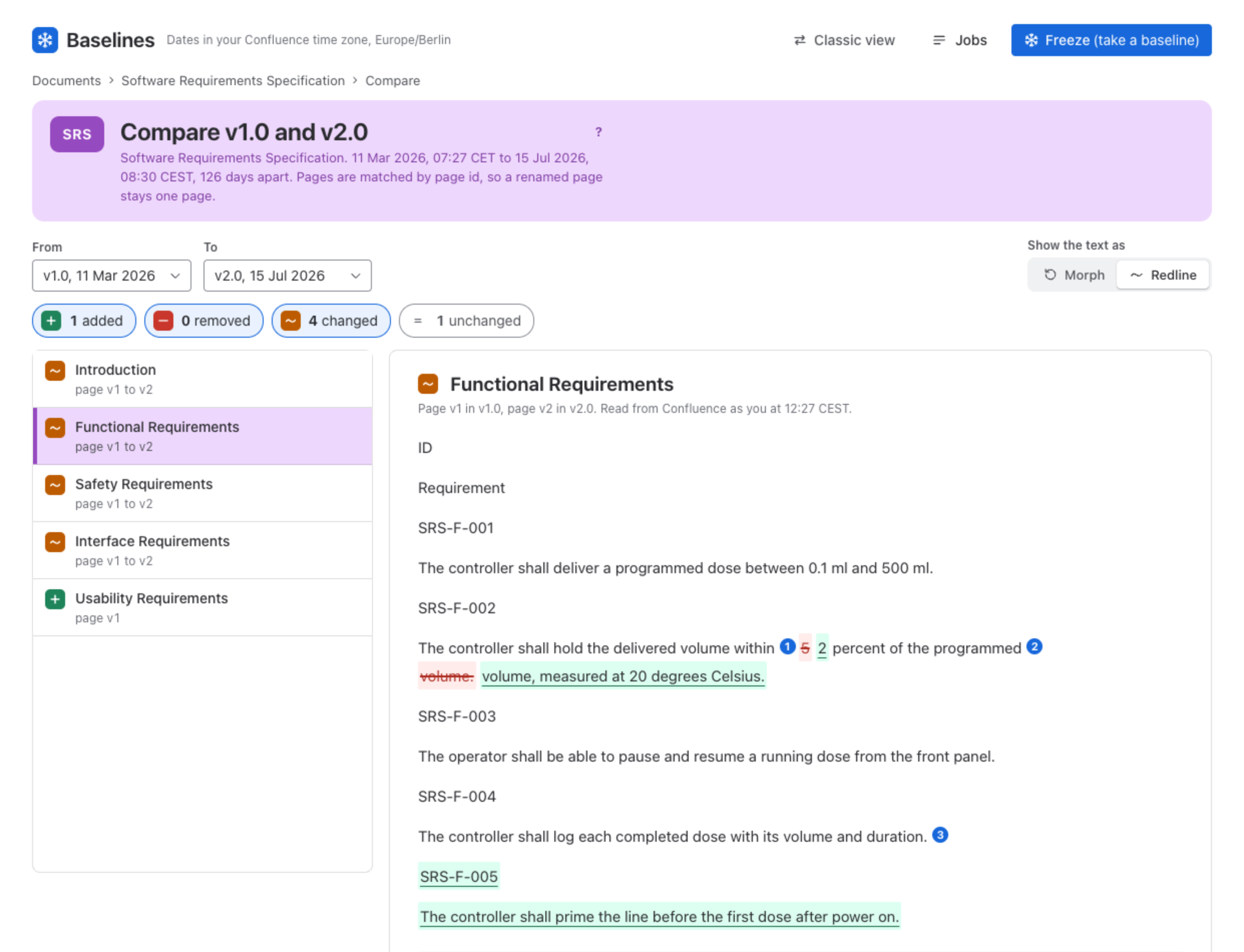
From and To pick the versions; Today, the pages as they are now, is a choice for To. The four counts, added, removed, changed and unchanged, each show or hide their pages in the list; unchanged pages are hidden at first. Pages are matched by page id, so a renamed page stays one page. Pick a page to read its text, and Open it in Confluence at the version shown.
Morph or Redline
Show the text as chooses how the words are marked. Morph plays the old text into the new, word by word, and Replay the morph plays it again. Redline strikes removed words, underlines added ones and numbers each change. Both versions of the page are read from Confluence as you.
Limits
Text only, word by word. Not compared: macro output, images, layout and formatting. A page says so where it matters:
- Only a macro changed: the text is the same in both versions.
- Too large to mark up: the page holds more words than Baselines marks up; a link opens Confluence’s own diff of the two page versions.
- Version no longer in Confluence: the captured page version is not in the page’s history any more.
- You cannot open this page: Confluence does not let you open it; someone who can open it can compare it.
- A Jira issues macro is rendered with today’s data for both versions, so its output is not compared.
Compare two releases
On a release’s page, Compare with an earlier release lists, for each document, the version each release holds: changed, added, dropped or the same version, with the page counts of each change and a link to compare the two versions. See Releases.
When to use it
- Gate reviews: what changed in a document since the version the last gate approved.
- Audits: show exactly which requirement text changed between two releases.
- Drift: compare the latest version with Today to see what was edited since the last freeze.
Was this page helpful? Yes · No · Contact support