 Baselines
 All documentation pages
Get started with Baselines
Baselines for Confluence Cloud freezes your Confluence pages as versions of a document: a record of exactly which page versions the document held at a review, a gate or a delivery. From there you can see what changed since, compare two versions word by word, bundle versions into a release, export a version or a whole release to PDF, and republish a version as a new Confluence page.
You need a Confluence Cloud site with Baselines for Confluence Cloud installed from the Atlassian Marketplace, and a group you belong to needs at least View in Baseline Configuration. Open the app from Confluence → Apps → Baselines.
What Baselines does
- Freeze records which version of each page and attachment a document holds, with its folders, whiteboards, databases and Smart Links in their place, as of now or as of an earlier date. Each freeze is a version with your own label, such as v1.0, v1.1 or v2.0. See Freeze.
- Documents: every freeze of the same pages is a version of one document, so you see one row per document instead of a long list of baselines. See Documents & versions.
- Compare shows which pages were added, removed or changed between two versions, and the words that changed in each page. See Compare versions.
- Releases bundle the versions frozen together for a gate or a delivery. A release can carry a status and exports as one evidence pack. See Releases.
- Schedules freeze a document every day, week or month, if you like only when something changed. See Schedules.
- Export PDF and Republish turn a version into a PDF with a cover and a manifest, or into a new Confluence page. See Export PDF and Republish.
- Deleted keeps deleted versions and releases for 30 days, and Activity records who did what. See Deleted & Activity.
A version records which version of each page and attachment it holds, and where its folders, whiteboards, databases and Smart Links sit. Baselines does not copy the pages: it reads them from Confluence, as you, when you compare, export or republish a version.
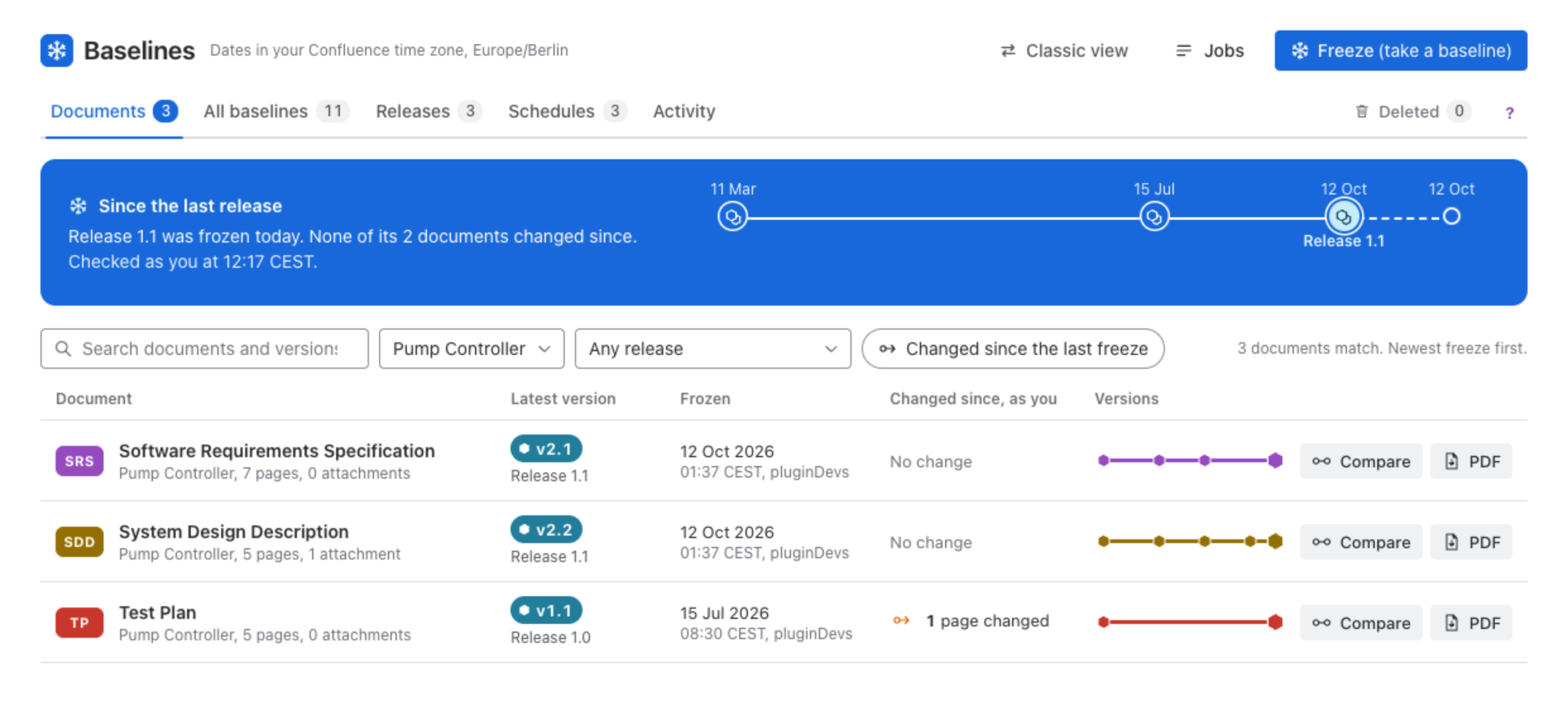
The screen at a glance
The bar at the top says which time zone dates are shown in (your Confluence time zone) and holds Classic view, Jobs and Freeze (take a baseline). Under it are the tabs, with a count on each, and a ? at the end that shows a short tour of the screen you are on.
| Place | What it shows |
|---|---|
| Documents | Every document, newest freeze first, with its latest version, its release and what changed since, as you. |
| All baselines | Every baseline on the site by date, one row each, as the classic list shows them. |
| Releases | The document versions frozen together for a gate or a delivery, with their status and evidence pack. |
| Schedules | The next 7 days, and every schedule with when it runs and whom it runs as. |
| Activity | Who did what, newest first, day by day. |
| Deleted | Deleted versions and releases, kept 30 days, with Put back. |
| Jobs | Freezes, exports, republishes and schedule runs while they run, and what they made. |
Quick start
Install and give your groups access
Install Baselines for Confluence Cloud from the Marketplace. A Confluence administrator then gives groups View, Freeze, Compare and Delete in Baseline Configuration. See Install & access.
Freeze your first document
Click Freeze (take a baseline), then Add pages. Tick the page your document starts from in the space tree and choose what comes with it: the page alone, its attachments, or everything under it. Give the document a short name and a first version label, such as v1.0, and press Freeze. See Freeze.
Freeze it again at the next gate
Freeze lists your documents with what changed since their last version and offers the next label. Tick Add to a release to bundle several documents under one name. See Releases.
Compare, export, republish
Open a document to compare two of its versions, export a version to PDF, or republish it as a new Confluence page.
Automate it
A schedule freezes a document on a rhythm, for example every Monday at 06:00, and can skip the run when nothing changed.
Coming from the classic list
If your site took baselines before the new view, they are already here. Freezes of the same pages became versions of one document, so the list is shorter. Nothing about a baseline changed, and All baselines lists every one by date. Freeze is what Create Baseline did, freezing a document again is what Retake did, and Import is now called Republish.
Classic view in the bar opens the classic list, and Baselines remembers your choice. Try the new Baselines brings you back. See Classic view & tours.
What’s next
Was this page helpful? Yes · No · Contact support