 Baselines
 All documentation pages
Documents & versions
The new view shows your baselines as documents. Every baseline of the same pages is a version of one document, labelled with the version in its name. Nothing about a baseline changes: the grouping is worked out from what the baselines hold, and All baselines still lists every one by date.
Document, version, baseline
| Word | Meaning |
|---|---|
| Document | A page and what you choose to come with it: its attachments, or everything under it. You freeze it again at every gate. |
| Version | One freeze of a document, with its own label such as v1.0, v1.1 or v2.0. It records which version of each page and attachment the document held, and the folders, whiteboards, databases and Smart Links among them. |
| Baseline | What a freeze stores. Each version is one baseline; All baselines lists them by date, as the classic list does. |
| Today | The pages as they are now, not frozen, read as you. It sits at the end of every document’s line of versions. |
How baselines become documents
Three tests decide whether two baselines are versions of one document. The first that fits decides; a baseline that fits none stays on its own.
- The same root pages. Taken from the same set of root pages, they are versions of one document, whatever their names say.
- A grown set. A later baseline that holds every page of an earlier one, and more, is its next version: the document grew. Only when the earlier one holds at least half as many pages.
- Most pages shared. Two baselines whose shared pages are 80% or more of all the pages the two hold between them are versions of one document. Only pages count, not attachments.
Tests 2 and 3 compare baselines of the same space only. A document’s page says which test joined its versions, for example Found as one document because its 3 freezes come from the same root page.
Version labels
A baseline has no field for a version, so Baselines reads it from the name: v2.3, V1.0.3, Version 2, ver. 3.1, or a number such as 2.0 standing on its own. A date, a time, a year, a standard such as ISO 26262:2018, or a gate number such as Gate 4.2 is never read as a version. Inside a document, a baseline whose name carries no version is numbered in date order instead: #1, #2, #3.
That is why a label you give on Freeze must be a number, such as v2.4: the version is stored in the baseline’s name, for example SRS v2.0 Release 1.0, and read back from it.
The Documents list
| Column | Meaning |
|---|---|
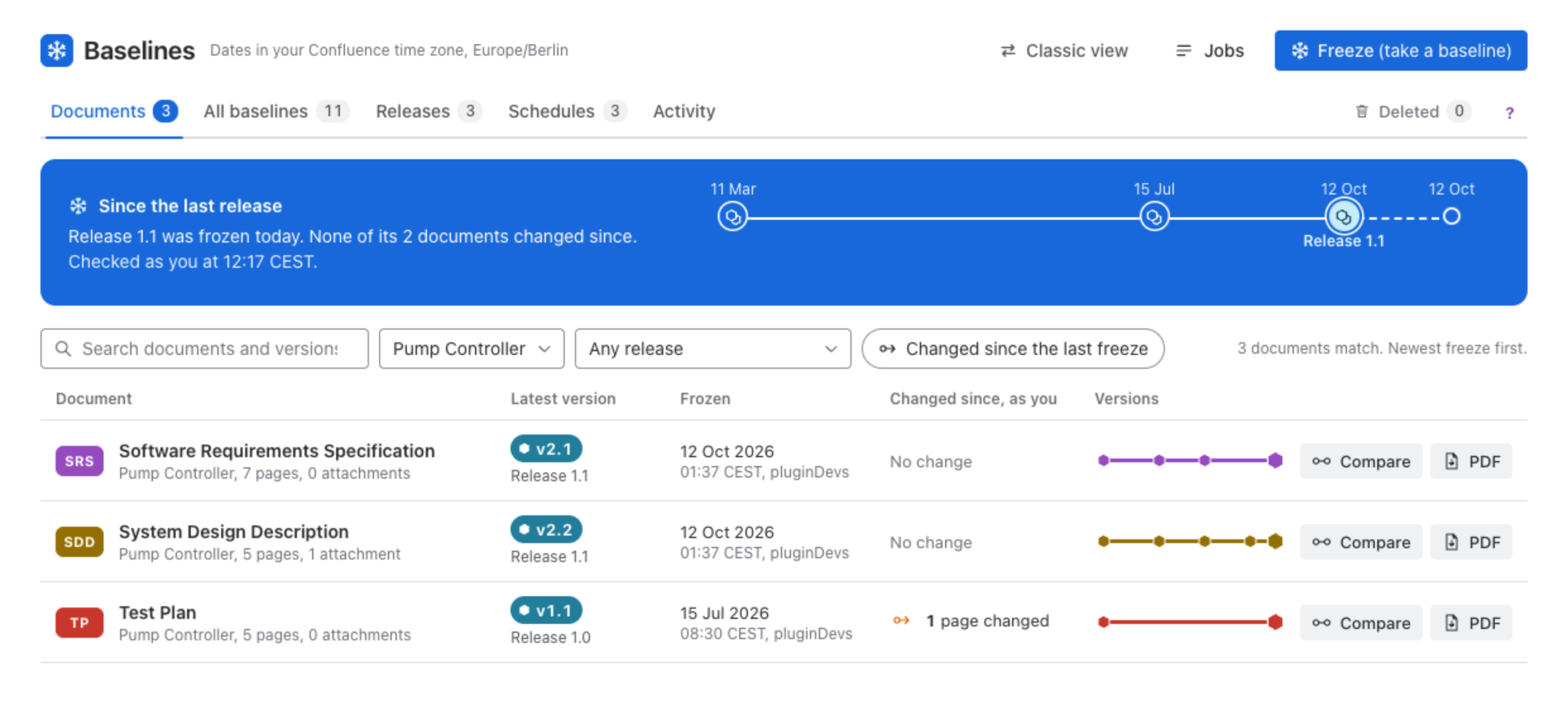
| Document | The colour chip with its short name, the document’s name, its space and how many pages and attachments its latest version holds. The name opens the document. |
| Latest version | The label of its newest version, and the release it is in. |
| Frozen | When the latest version is as of, and who froze it. |
| Changed since, as you | What changed in Confluence since the latest version, checked as you: No change, 1 page changed, 1 new page, or You cannot open its pages. A document of more than 2,000 stored pages waits for its Check button. |
| Versions | Its versions on a short line; each mark opens that version. |
| Compare opens its last two versions, and PDF exports its latest version. |
Above the list, Search documents and versions, the space filter, the release filter (Any release, In a release, or Latest version in no release) and Changed since the last freeze narrow it. When the site has releases, Since the last release says what changed in the last release’s documents and offers to freeze the changed ones into the next release.
Other freezes
A baseline that is on its own and has no version in its name belongs to no document. Documents lists the newest six under Other freezes, and All baselines lists all of them. Make a document makes it a document of one version, v1, so that you can freeze it again later; the flag offers Undo.
Correct a document
Grouping can be wrong in the direction of showing two documents where you see one, never of losing a baseline. The More menu on a document’s page corrects it, and every correction is listed in Activity under Grouping:
| Action | What it does |
|---|---|
| Move a version to another document | For a freeze that grouping put in the wrong document. The flag offers Undo. |
| Rename | Changes the document’s name and short name. Version labels stay as they were. |
| Set purpose | One line on why the document is frozen. It shows on every version card and on the PDF cover. |
| Edit pages | Changes the root pages and what comes with them. It applies from the next freeze; versions frozen so far stay as they were. |
These need the Freeze permission. See A document’s page.
All baselines
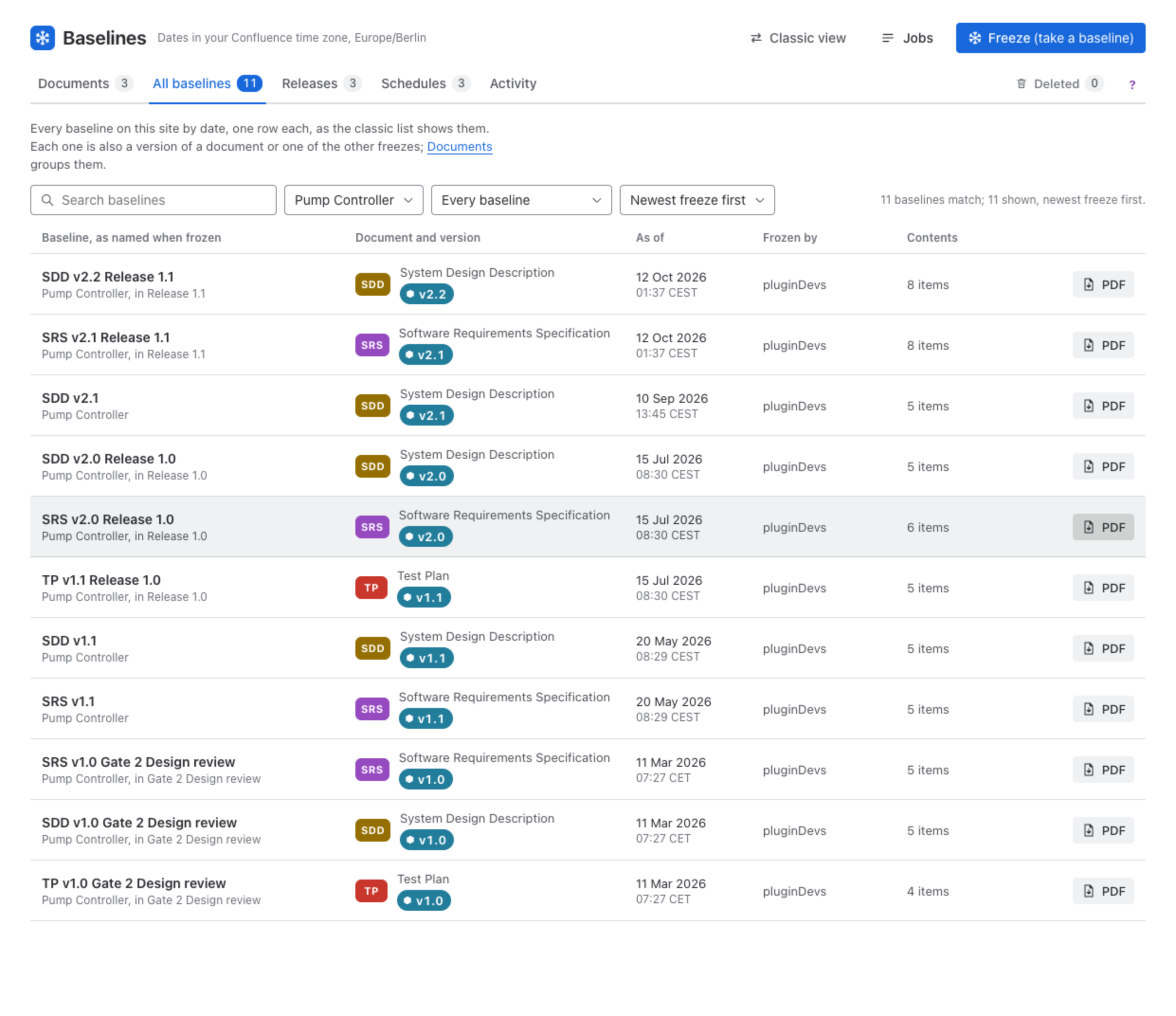
All baselines lists every baseline on the site by date, one row each, as the classic list shows them: the name it was frozen under, the document and version it is (or Other freeze), when it is as of, who froze it (a clock marks a schedule), what it holds, and PDF. Filter it by space and by kind (Every baseline, Versions of documents, Other freezes), and order it newest first, oldest first or by name. A baseline’s name opens its version on its document’s page.
Was this page helpful? Yes · No · Contact support