All documentation pages
SLAs
SLAs sets what each SLA timer measures: its scope, its goal, its calendar, and when it starts, pauses and stops.
- Jira admins, Full configuration, and the Manage SLAs grant can create and change SLAs. A grant limited to some projects or SLAs reaches only those.
- With Project admins manage SLAs for their own projects switched on in Permissions, a person with Administer Projects in Jira can change an SLA when every project it measures is one they administer.
- View configuration reads every SLA without changing it.
The SLA list
The lead says how many SLAs the site has, how many are enabled, and how many SLA timers have breached, for example "8 SLAs, 7 enabled. 12 SLA timers have breached, on 4 of them." The line under it counts the configuration problems and names the SLAs that have them.
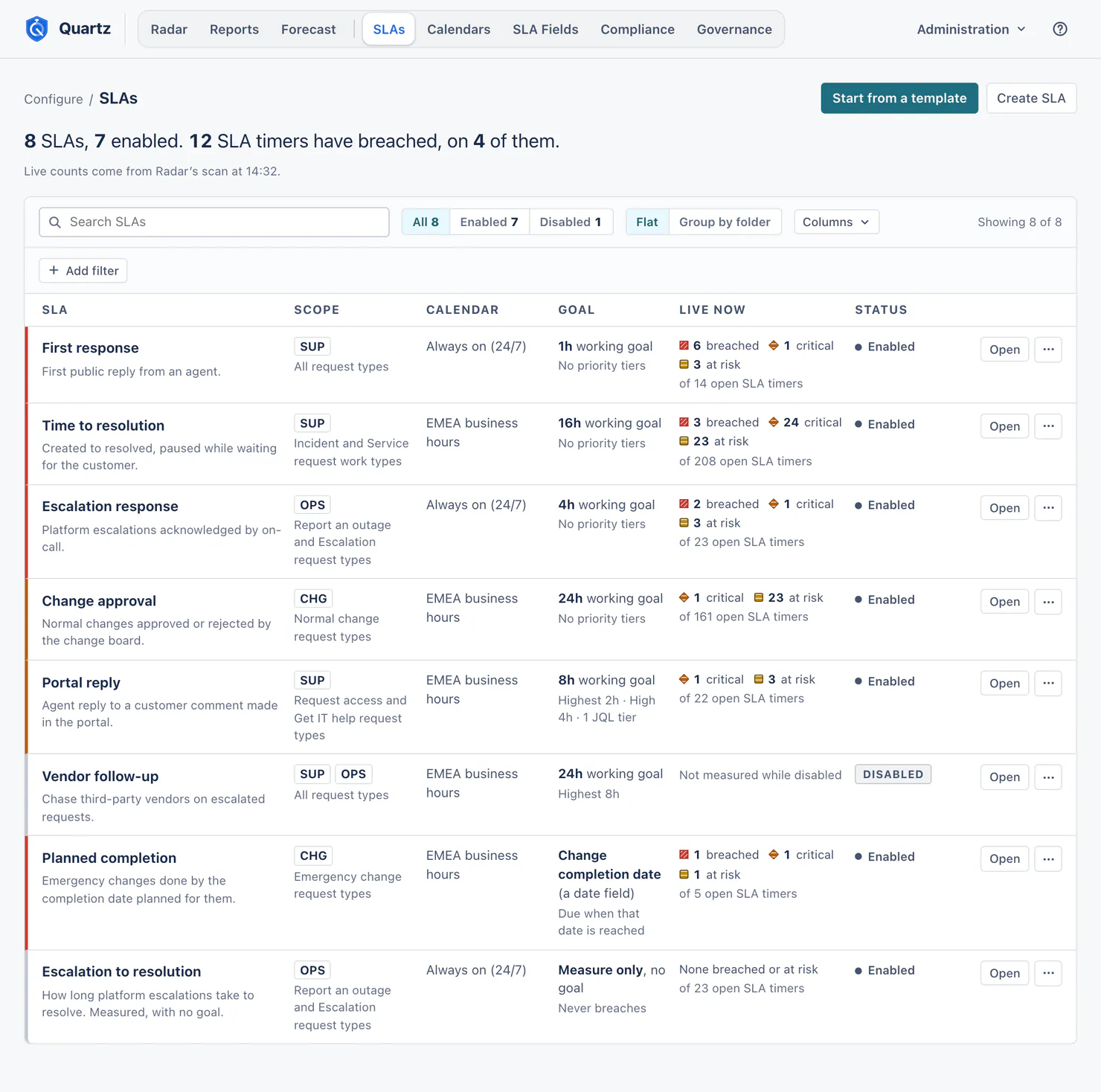
Each row shows the SLA's name and description, its scope (projects, request types, work types), its calendar, its goal and goal tiers, Live now (breached, critical and at risk, of its open SLA timers) and its status (Enabled or Disabled).
- Search SLAs searches the name, the description and the scope, projects and request types included.
- All, Enabled, Disabled.
- Flat or Group by folder. A folder groups SLAs on the list; the name lives on each SLA.
- Columns: choose which of scope, calendar, goal, changed and live counts show. The name, the description and the status are always shown.
- Add filter: Project, Request type, Calendar, Goal type, Compliance control, Configuration problem, Changed by, Folder. Only the values your SLAs use are offered.
Live counts, and the breached total in the lead, come from Quartz's own record of open SLA timers. They are read as you: they count the SLA timers on requests you can browse, and leave out the ones with an exception. An SLA whose requests Quartz is still reading says so: "Quartz is still reading this SLA's requests: 3,400 of about 9,000." An SLA being recounted after a change says how far the recount got. When that work waits for Jira's hourly limit for apps, the line says why and until when.
After Create SLA, the editor follows the read of the new SLA's requests and drops its band when the read ends, with no reload. When no request is in the new SLA's scope yet, it says so at once: "No request is in this SLA's scope yet, so Quartz has nothing to read for it. It measures each request that comes into its scope from now on."
Templates, and describing an SLA
Start from a template offers five templates. Each opens as a new SLA that is not saved until you create it.
| Template | Starts from |
|---|---|
| Time to first response | Created to the first public reply, tighter goals for higher priorities. |
| Time to resolution | Created to resolved, paused while waiting for the customer. |
| Incident resolution (ITIL) | Priority-based incident resolution goals, paused while waiting for the customer. |
| Service request fulfilment (ISO/IEC 20000) | Fulfil standard service requests within an agreed window. |
| Security incident response (SOC 2) | A fast response to security incidents, on a calendar open every hour. If no calendar on your site is open every hour of every day, the template offers to create one with the SLA, or lets you choose a calendar. |
Templates are a starting point. They do not make you compliant or replace certification.
Describe your SLA (Advanced edition): say what the SLA should measure, in up to 500 characters, and Quartz drafts it in the editor, where you check every field before anything is saved. It understands phrases like "next business day" and "within 3 business days".
The SLA editor
Every time the editor prints is in your site's time zone, which is the time zone of your default calendar, or in your own zone if you chose Help > Show times in my zone. A line under the lead names the zone. A time of day you set on a Working days goal, like 16:00, is different: it is read on the SLA timer's calendar, in that calendar's time zone. Nothing is saved until you choose Create SLA or Save changes.
Basics
- Name, Description (optional) (up to 2,000 characters; the editor counts against 200 and says when a description is longer, but still saves it), Folder (optional).
- Measure with this SLA: an enabled SLA measures every request in its scope from the moment you save.
- Compliance controls (optional): the ITIL, ISO/IEC 20000 and SOC 2 controls this SLA puts a timer on. See Compliance.
- Customer portal: whether customers see this SLA on the portal, and under which name. See The customer portal.
What this SLA measures
Every part you fill in must match. Leave one empty and it matches everything.
- Projects, Request types (service projects only), Work types (matched by name), Priorities, Organizations, Components.
- JQL filter (optional): only requests that also match this query are measured. Test counts the requests it matches today inside the SLA's scope, among the requests you can browse. A Jira admin also sees how many more match beyond those ("12 more are in projects you cannot browse."). Anyone else who manages the SLA sees that line only when the SLA's scope names projects and they can browse every one of them; it then counts requests a security level hides from them. On a saved SLA, that line counts the saved scope, so save a changed scope first.
The Measures line sums up the scope in words.
Timer rules
Start from a preset (Time to resolution, First response, Time in a status) or build Your own rules.
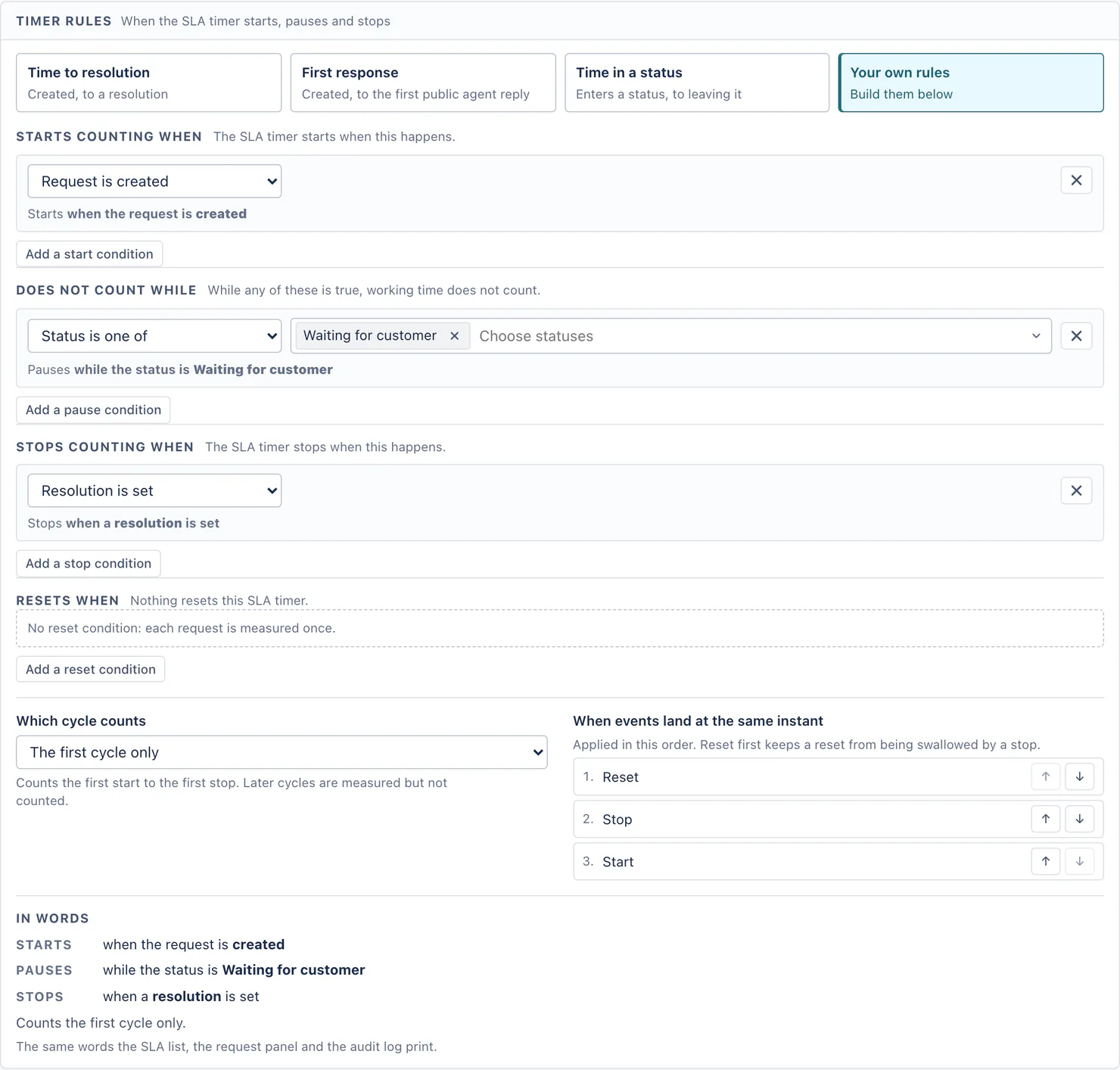
- Does not count while (pause) has its own conditions: Status is one of · Status category is one of · A field is one of. Starts counting when, Stops counting when and Resets when are each a list of these conditions: Request is created · Resolution is set · Resolution is cleared · Resolution changes · Assignee is set · Assignee is removed · Assignee changes · Priority changes (raised, lowered, or to chosen priorities) · Status enters or leaves (from and to pairs) · Status category changes · A field changes (is one of, changed from, changed to, greater, less, first set, empty, not empty) · A date is reached (with an offset) · A comment is made (any comment, a public comment or an internal note; by anyone, by the reporter, by anyone but the reporter, by an agent of the request's service project, by the assignee, by named people or by members of groups) · Another SLA timer (starts, is met, breaches, stops met or breached, goes paused).
- Pause when all the pause conditions hold, or when any one does.
- Which cycle counts: the first cycle only, the last cycle only, every cycle added together, or one span from the first start to the last stop.
- When events land at the same instant: the order Quartz applies them in (reset first keeps a reset from being swallowed by a stop).
- In words reads the rules back in the same words the SLA list, the request panel and the audit log print.
"An agent" means an agent of the request's service project, as Jira Service Management counts it. Comment conditions ignore comments from the accounts you add under Settings > Automation and bots (Accounts to ignore). They ignore comments from Atlassian app accounts, such as Automation for Jira, only while Ignore automation and apps is switched on there. That switch is off until someone turns it on, and while it is off an automated reply from an app account counts as a comment. Quartz's own notes and replies (from alert rules) never start, pause or stop an SLA timer.
Goal
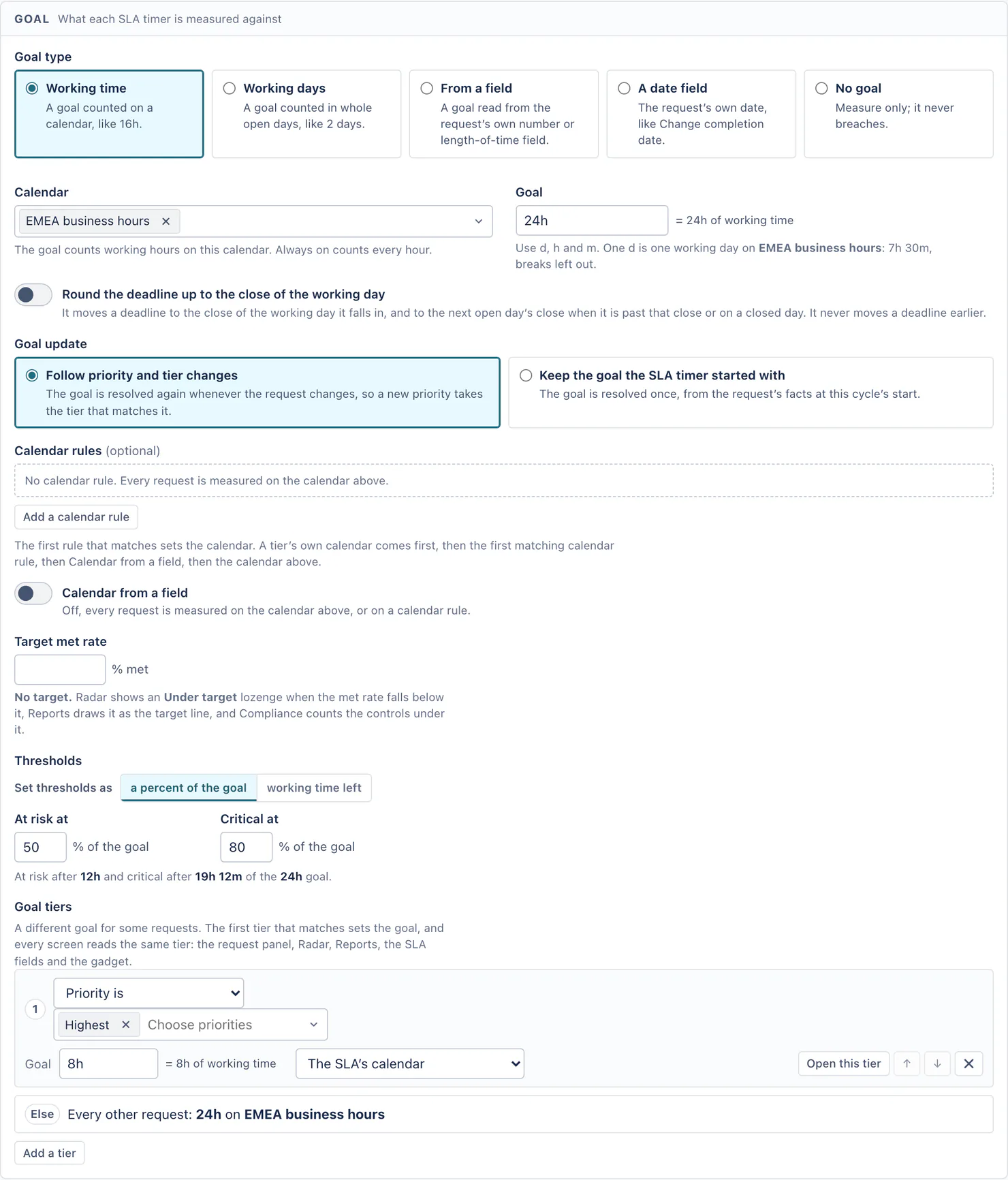
- Goal type:
- Working time: a goal counted on a calendar, like 16h.
- Working days: a goal counted in whole open days, like 2 days, due at the close of the last one or at a time of day you set.
- From a field: a goal read from the request's own number or length-of-time field, with a fallback goal.
- A date field: the request's own date, like Change completion date. A date with no time is due when that day closes on the calendar, or at the close of the last open day before it.
- No goal: measure only; it never breaches.
- Calendar: which working hours count. Use d, h and m in a goal; one d is one working day on that calendar.
- Round the deadline up to the close of the working day: it never moves a deadline earlier.
- Goal update: Follow priority and tier changes, or Keep the goal the SLA timer started with.
- Calendar rules (optional) and Calendar from a field: the first rule that matches sets the calendar. A tier's own calendar comes first, then the first matching calendar rule, then Calendar from a field, then the calendar above.
- Target met rate (optional): Radar shows Under target when the met rate falls below it, Reports draws it as the target line, and Compliance counts the controls under it.
- Thresholds: set At risk and Critical as a percent of the goal, or as working time left.
- Goal tiers: a different goal for some requests, by priority, request type, work type, label, component, Organization, assignee, assignee in a group, any field (is one of, is not, is empty, is not empty, greater, less) or JQL, each with its own calendar if you like. The first tier that matches sets the goal, and every screen reads the same tier: the request panel, Radar, Reports, the SLA fields and the gadget.
Preview and dry run
- Preview (what this draft measures, read as you): the open requests in scope now, the five newest you can browse, and a quick sample of the last 30 days measured with the unsaved draft. An unbounded query that takes longer than 5 seconds reads "at least N".
- Dry run: Run over 30 days or Run over 90 days reads every request resolved in that range and measures it with this draft: met, breached and measured, and how that differs from the saved SLA over the same requests. A dry run started by someone who is not a Jira admin does not check the JQL written into the SLA (its JQL filter, JQL goal tiers and JQL calendar rules), for the draft and the saved SLA alike, so it covers every request in the rest of the scope. A dry run a Jira admin starts checks them. Nothing is written to Jira and no SLA timer moves. It runs in the background; you can leave the page and come back.
Saving a change to how SLA timers are measured
A save that changes how SLA timers are measured asks what should happen to the ones that already stopped:
- Stopped SLA timers keep their result (the default): nothing already measured moves. This is what Jira Service Management does.
- Recount stopped SLA timers since a date inside your history: Quartz measures them again with the new settings, in the background. The SLA list and the editor show how far it has got, and Reports and Compliance change with it. Also update the SLA fields writes each new result into the SLA's fields on the request; without it, a recount changes Quartz's own reports and writes nothing into Jira.
Running SLA timers always follow the new settings. The same question also offers Send alerts for SLA timers this change makes breached, off by default. You choose it before the save and without a number: Quartz learns how many open SLA timers the change made breached only when it measures them again in the background, and the question says so ("The number is not known until the save is made.").
A save also tells you when someone else saved the same SLA after you opened it, and never overwrites their change.
JQL in an SLA
- A JQL filter or a JQL goal tier must be a query Jira accepts. Configuration health checks every one of them.
- A query that reads differently for each person (for example one using
currentUser()) is refused, because each screen that reads the SLA would measure different requests. Name the people, projects or dates instead. - A query that changes as time passes (relative dates such as
-30d,startOfDay()) or as groups, sprints or versions change is allowed. The editor says "Quartz asks Jira for this query again every hour, so requests move in and out of this SLA as its answer changes." - Jira counts only bounded queries, so Test on an SLA that covers every project asks you to narrow the query, for example to a project or a date range, before it can count it.
Enable, disable, clone, delete
- Disable stops measuring and keeps the SLA ("Stop measuring, keep the SLA"). A disabled SLA is not measured, is not alerted on, and counts toward no Compliance control. Enable starts measuring again, and Quartz reads its requests.
- Clone puts a copy right after the SLA.
- Delete SLA asks first and says what depends on it: the SLA fields that read it, and the SLAs whose timer rules wait on it (they keep that condition and show a configuration problem). The extensions and exceptions on its SLA timers go; the record of who extended or excepted them, and why, stays; its history stays reportable in Reports as "(deleted)". Request history is untouched and you can create the SLA again, but this cannot be undone. An enabled SLA also offers Disable instead.
Every change is recorded in the Audit log with every field before and after, and a backup is saved before it.
Configuration problems
When something an SLA names is renamed or deleted in Jira (a status, a priority, a work type, a field), its SLA timers can stop working with no error. The same holds for a name this site never had, which a template or a file from another site can bring in: "Time to resolution" waits on the status "Waiting for customer", for example. Configuration health finds those and says plainly that the name does not exist on this site (It waits on the status “Waiting for customer”, which does not exist on this site. That condition can never fire.). It also finds a calendar an SLA names that no longer exists. The SLA's row then carries a link that opens the editor at the card that fixes it. Configuration health does not check the groups a timer rule, a goal tier or a calendar rule names: if such a group is deleted, nobody matches through it any more, and no problem is reported. See Settings.
Something unclear or wrong on this page? Contact support.