All documentation pages
The customer portal
On a service project, customers can see the SLA timers of a request they open in the Jira Service Management portal: each one's name, whether it is on track, and how long is left. SLA names are written for agents, so this stays off until you turn it on.
Jira admins and people granted Full configuration, in Settings > Customer portal.
Turning it on
Show SLAs to customers: customers see only the SLAs you leave on (every SLA is on until you turn it off below, an SLA created later included), each under the name you give it for customers, or under the SLA's own name when you give none. They see it the next time they open a request.
Which SLAs customers see
- Each SLA is listed with Name customers see. Leave a name empty to use the SLA's own name; a name is at most 80 characters.
- A disabled SLA is listed, and customers see nothing from it while it is off.
- An SLA created later is shown to customers under its own name until you change it here.
On which request types
- Every request type: on every request of a service project.
- Only the request types I choose: only on requests of the types you choose. Request types in projects you cannot browse are counted but not named, and stay chosen.
- No request type: the portal shows no SLA timer on any request, and your choices above are saved as they are.
Hide SLA timers that have not started
- Off: a request whose SLA timers have not started reads "Your request is in the queue. Its service level starts when an agent picks it up."
- On: customers read nothing about them until they start.
What a customer reads previews the portal panel for a request type you choose. Each chosen request type is named with its project ("Submit a request or incident · SUP"), because two projects can have request types of the same name, and the preview lists only the SLAs that measure that request type in that project. If Jira does not answer when Quartz reads the chosen request types, the preview says so, and they stay chosen.
Switching the portal off keeps every choice, so switching it on again restores them.
What customers see
The Service level panel on the request lists each SLA shown, under the name customers see, with its state (On track, At risk, Critical, Breached or Met, with ", paused" while the SLA timer is paused; Measuring or Measured for an SLA with no goal; No date set for a date goal whose date is empty) and the time left while it runs. When a goal has passed, the time reads "past the goal". The panel ends with "Times count our working hours only."
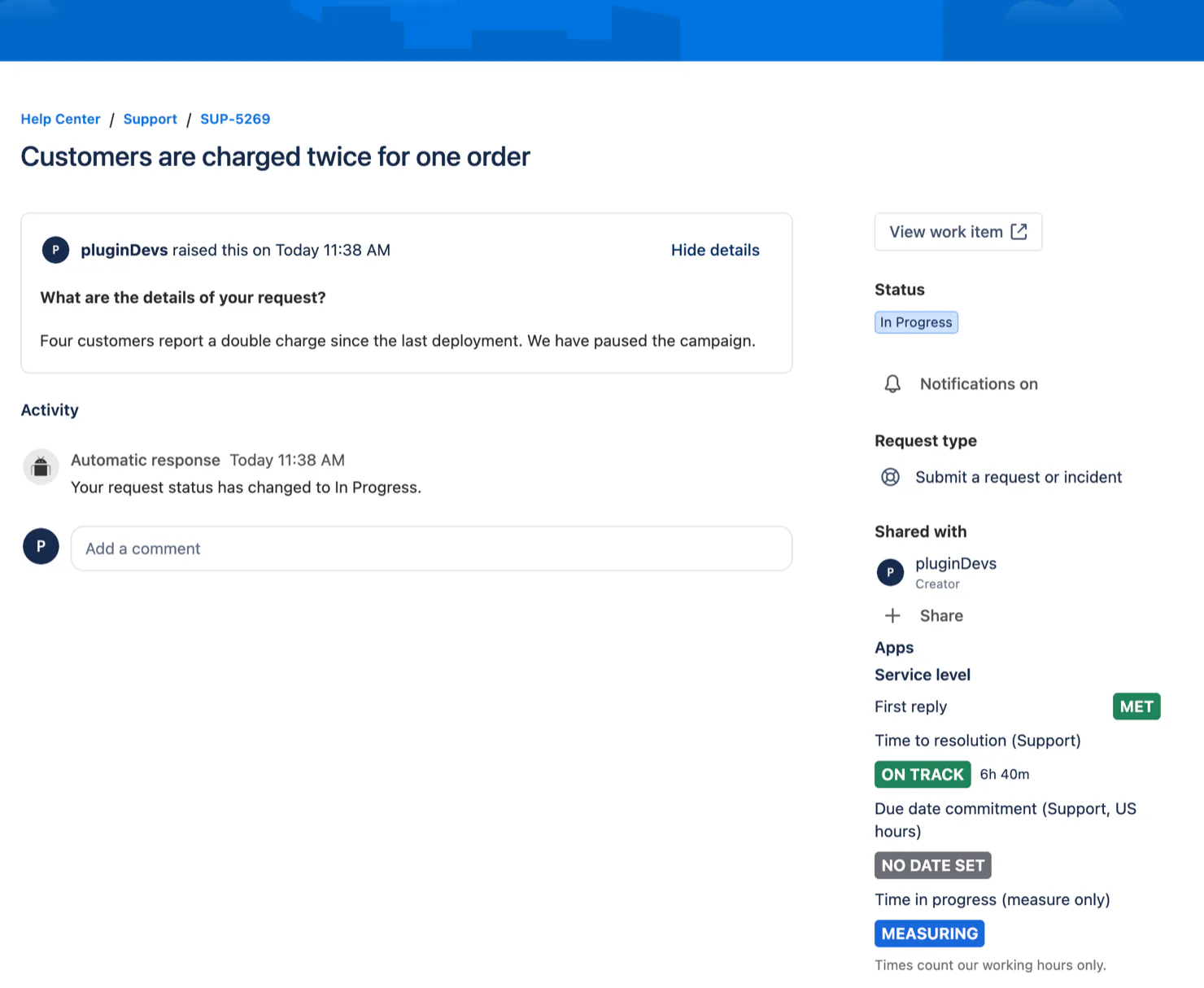
The time left counts the SLA timer's working hours, so a customer reads the same time left wherever they are. Quartz uses the customer's own time zone when the portal gives it, and otherwise the time zone of the SLA timer's calendar. A paused SLA timer's time left holds still while it waits.
Measured on a test site: the panel opened in about 3 seconds, and the first open after a quiet half hour took about 10 seconds, while the portal started Quartz again.
When Quartz cannot read the request again just now, the panel shows Quartz's last record of it and ends with the time of that record ("Updated at 14:37."). When Quartz has nothing to show yet, the panel reads "We couldn't load the service level just now. Try again after 15:00." Customers are never told why.
Customers never see an SLA's scope, its conditions, its calendar, another request, or an SLA timer with an exception.
When the panel appears
The Service level panel appears on a request only when it has something to show. Customers see no panel, and no empty Service level heading:
- on every request while Show SLAs to customers is off, which is how Quartz is installed, or while it is set to No request type;
- on a request whose request type the card leaves out, whether an SLA measures it or not;
- on a request none of whose SLAs is shown to customers, when there is nothing to say about SLA timers that have not started either;
- on a request whose SLA timers customers may see have not started yet, while Hide SLA timers that have not started is on.
On a request no SLA measures, of a request type the card shows, the panel reads "No service level applies to this request." The panel can also appear on a request Quartz has not measured yet, until it does. If an imported configuration names the card's request types by name rather than by the ones picked from the list, the panel on a request no SLA measures reads "No service level applies to this request." whatever its request type; pick the request types again on the card to hide it there.
Turning the card on or off takes effect the next time a customer opens a request. A change to which request types or SLAs customers see reaches each request as Quartz updates it in the background after you save. Hiding the panel is only about what the portal draws: every time the panel reads, Quartz checks again what this card allows for that request, so a customer never sees more than the card shows.
Who can see SLA names
SLA names are written for agents. In the portal, customers see only the SLAs you leave on, each under the name you give it here, or under the SLA's own name when you leave that name empty.
People with Jira product access are different. Anyone with a Jira licence who can open Quartz can open Radar while View Radar is open to everyone, which is how Quartz is installed, and Radar shows the SLA names on every request that person can browse in Jira. On a service project that includes a licensed Jira user who is only a customer of that project: where Jira lets them browse their own requests, Radar shows them the SLA names on those requests, including SLAs this card hides from customers.
Restricting View Radar is the control for that. In Permissions, name the groups and people who may view Radar (your agents), or add the others to Everyone except, and nobody else can open Radar. Reports follows View Reports in the same way. Quartz's request panel in Jira shows a request's SLA timers, with their SLA names, to people who can open that request in Jira itself, as Jira Service Management's own SLA fields do.
Quartz's search property never carries an SLA name to anyone, and Quartz's Rovo agent refuses a customer who has no Jira product access:
- Quartz's search property on a request holds the worst state, the next deadline, the minutes left, the breached count and opaque tokens, and it can hold the word hide where the portal panel has nothing to show: never an SLA name. A search by SLA name goes through Quartz's own JQL function, which looks the name up inside Quartz. See SLA Fields.
- Quartz's Rovo agent (Advanced edition) answers only people with Jira product access, and it names SLAs to them. Asked about one request, it gives each SLA timer on it under the SLA's own name to anyone with Jira product access who can open that request in Jira, as the request panel does, whatever View Radar says. That includes a licensed Jira user who is only a customer, on the requests Jira lets them browse, and SLAs this card hides from customers. Its list of SLA timers at risk follows View Radar, and its report follows View Reports. A customer with no Jira product access who reaches it is refused, in the same words a Jira user without access to that request, to Radar or to Reports gets.
Related
- SLAs: the Basics card of each SLA says whether customers see it on the portal and by which name.
- Settings: the rest of Settings.
- Permissions: View Radar, View Reports and Everyone except.
Something unclear or wrong on this page? Contact support.