All documentation pages
SLA Fields
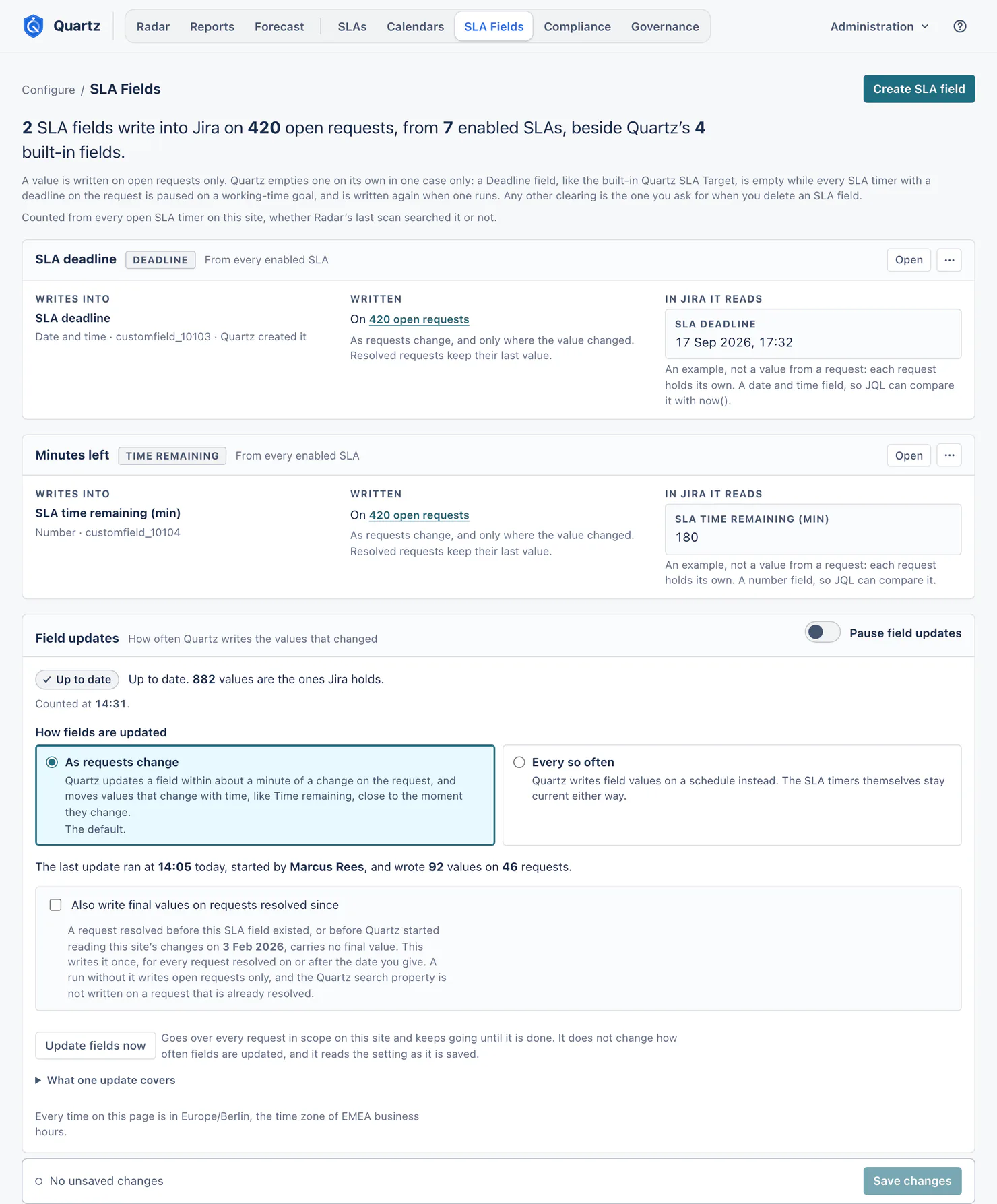
SLA Fields copies SLA timer values onto requests in Jira fields, so JQL, boards, queues and Jira Automation can read them.
Jira admins, Full configuration and the Manage SLA fields grant can change SLA fields. View configuration can read them. Creating a new Jira field still needs Jira admin rights. Someone who is not a Jira admin can pick only a Jira field that Quartz created, or one that an SLA field they manage already writes into: any other existing field is a Jira admin's choice. A grant limited to some projects or SLAs can change an SLA field only when every SLA it reads is inside the grant, and it has to pick Chosen SLAs only: Every enabled SLA would also reach SLAs added later.
Three ways to read Quartz from Jira
| Setup | JQL | Jira Automation | Where | |
|---|---|---|---|---|
| The four built-in fields | None | Yes | In a rule's JQL search; for a rule that acts on a change, use an SLA field | On the request where a Jira admin put them on its screen, and as columns in searches, queues and boards |
| Quartz's search names and quartzSla() | None | Yes | Yes, in a rule's JQL search; in a rule's JQL condition, with the exact token | Requests Quartz measures, except ones already resolved when Quartz 5 started reading your site's changes (below) |
| SLA fields | You map a value to a real Jira field | Yes | Yes, "Field value changed" and JQL | Every request its SLAs measure, where Jira takes the value (below); a person sees it where the field is on the screen |
The built-in fields
Quartz fills four fields itself, in the background, and writes them each time an SLA timer on the request changes state:
- Quartz SLA Status: the worst SLA timer status on the request, in Quartz's own words.
- Quartz SLA Target: the earliest deadline of an SLA timer running on the request. A paused SLA timer on a working-time goal has no fixed deadline (its deadline moves later for as long as the pause lasts), so while every such SLA timer on the request is paused, Target is empty.
- Quartz SLA Remaining (min): working minutes left on the most urgent SLA timer, negative once it has breached. Between changes of state it holds the minutes left at the last one: for minutes that move, search
quartzMinutesLeft. - Quartz SLA Breached count: how many of the request's SLA timers have breached.
A request shows them only where a Jira admin has put them on its screen; JQL searches them, and Jira's searches, queues and boards can show them as a column. They are read only. For a Jira Automation rule that acts when a value changes, use an SLA field: that is what SLA fields are for. Quartz writes a built-in value only when Jira would show it differently, so an unchanged Quartz SLA Target adds no entry to a request's History (measured on a test site: none on 14 requests in more than ten hours of writes).
Quartz's search names
Quartz writes its own search property on each request it measures while the request is open, and the property stays once the request is resolved, whether or not an SLA field is set up, so these names work in JQL with no configuration. A request that was already resolved when Quartz 5 started reading your site's changes carries none unless it is reopened, and Update fields now does not add it: these names and key in quartzSla() do not find it, and key not in quartzSla() finds it as it finds a request the SLA does not measure. The property holds the worst state, the next deadline, the minutes left, the breached count and opaque tokens. It can also hold the word hide, on a request where the customer portal panel has nothing to show. It never holds an SLA name: who can read a request's properties is up to Jira and to every app on your site, so Quartz keeps names inside Quartz.
| Name | What it holds | Example |
|---|---|---|
quartzWorstState |
The worst state on the request, in the words the built-in Status field writes, without ", paused". | quartzWorstState = "Breached" |
quartzNextDue |
The soonest fixed deadline among the request's SLA timers: a running one's, or a date goal's. A paused SLA timer on a working-time goal has none. | quartzNextDue <= endOfDay() AND resolution IS EMPTY |
quartzMinutesLeft |
Working minutes left on that deadline, in the steps a Time remaining field takes: exact at each threshold and at the deadline, and below zero once it has breached. | quartzMinutesLeft < 60 AND resolution IS EMPTY |
quartzBreachedCount |
How many of the request's SLA timers have breached. | quartzBreachedCount > 0 |
quartzSlaTokens |
One opaque token for each SLA and state on the request. | quartzSlaTokens ~ "qz4817e3s1" |
When no enabled SLA measures a request any more (its scope changed, or its SLA was deleted), Quartz removes the property from that request, so these names stop finding a request Quartz no longer measures. Once after an upgrade, Quartz checks every request that holds the property in the background; after an SLA is deleted, it checks the requests whose property still names that SLA's tokens. The SLA Fields page shows how far it has got, and until it finishes these names can still find some of those requests. If Jira cannot run that search to its end, Quartz removes what it found and tries again later, first after an hour. A run that stops before it finishes (Jira or Quartz's database failing) is tried again after 1, 2, 4 and 8 hours, then once a day, from where it had got to; after five failures in a row, configuration health says so.
Search by SLA name: quartzSla()
Quartz adds its own JQL function. It looks the SLA up by name inside Quartz and finds the requests where that SLA's timer is in the state you ask for:
key in quartzSla("Time to first response", "breached")
key in quartzSla("Time to first response")
key not in quartzSla("Time to resolution", "met")
- The SLA's name is the first value. Upper and lower case count alike, and spaces around the name are ignored. Two SLAs with the same name are both searched, enabled or not. A name no SLA has shows no error, and with
init finds nothing, the same as the name of an SLA with no SLA timer on a request you can browse. - The state is the second value, and it is optional: breached, at risk, critical, paused, running, met or ever breached, in upper or lower case, with a space or a hyphen (at-risk). Left out, any of these states counts. Any other word is a mistake, and Jira's search page shows the list of states (see When a query has a mistake below).
not infinds every request where that SLA timer is not in that state. That includes every request the SLA does not measure, requests Quartz measures nothing on among them, in every project you can browse: the example above also finds requests Time to resolution does not measure. To keep to the requests the SLA measures, name the SLA once more:key in quartzSla("Time to resolution") AND key not in quartzSla("Time to resolution", "met").- Where it works: Jira's search, saved filters, board and queue filters, and the JQL search a scheduled Automation rule runs (each checked on a test site).
- Not in an Automation rule's JQL condition ("If work item matches JQL"). There
quartzSla()matches nothing and shows no error, even though the condition's own check of the query says it finds requests (measured on a test site). In a JQL condition, use the SLA's exact token below: SLA Fields writes it for you. - The results follow the SLA timers as the search property does: within about a minute of a change on the request, and close to the moment an SLA timer reaches a threshold. After a large bulk change, or the first read of a site's history, the property can follow later, because Jira runs one bulk update of properties at a time on the same requests (measured on a test site: up to about 20 minutes after a bulk edit of 500 requests). When an SLA is created, renamed or deleted, Quartz updates Jira's stored answer for every search that names it right away.
- A saved filter keeps the name you wrote. After you rename an SLA, it finds nothing until you write the new name, or use the SLA's token below, which never changes.
- Jira shows each person only the requests they can browse.
When a query has a mistake. A state quartzSla() does not know, or quartzSla() after a field other than key (for example parent in quartzSla("Time to first response")), is a mistake. Jira shows the error on its search page, in Quartz's words, for example "The second value of quartzSla() must be an SLA timer state: breached, at risk, critical, paused, running, met or ever breached." Elsewhere (an Automation rule, a script, Jira's REST search) the same query can find no requests and show no error, as Jira's REST search did on a test site. So try a query you change by hand on Jira's search page before you put it in a rule. A name no SLA has is not a mistake: it shows no error, even on Jira's search page.
The exact token
quartzSlaTokens ~ "qz4817e3s1" names one SLA in one state: qz, a number of this installation of Quartz, e, the SLA's number, s and the state's number. One token never matches another SLA, even one whose name shares words, and it stays the same when the SLA is renamed, so a filter or a rule on it keeps working. It works everywhere Jira takes JQL, an Automation rule's JQL condition included. Nobody types a token: SLA Fields writes it for you. The tokens belong to this installation: when Quartz is uninstalled and installed again, or its data is cleared, the tokens change, and SLA Fields writes the new ones.
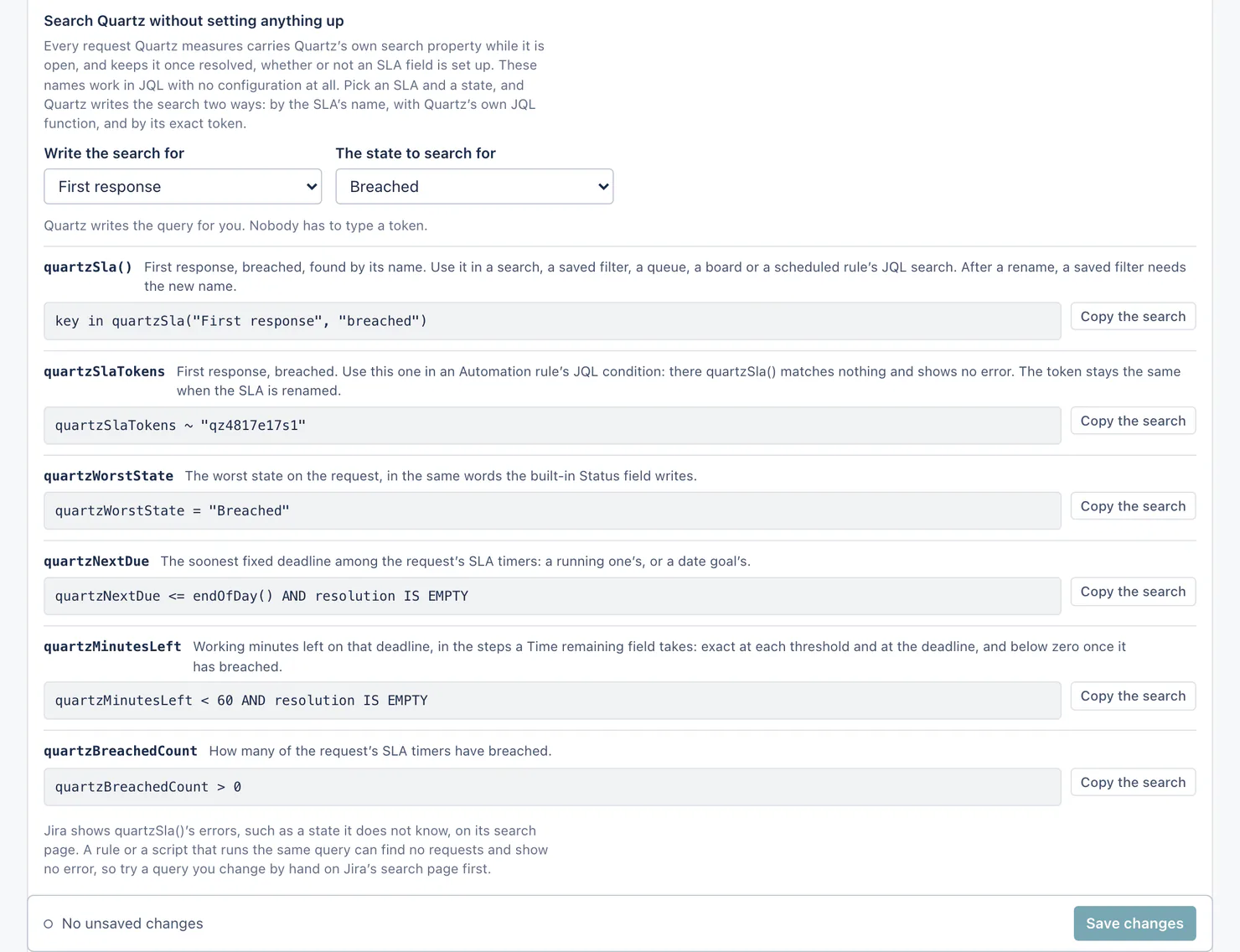
The SLA Fields page lists these under Automation and JQL: pick an SLA and a state, and it writes the search both ways, by name with quartzSla() and by the exact token, each with Copy the search, and says which one a rule's JQL condition takes. Its recipe Check an SLA timer in a rule's JQL condition writes the token for you.
Creating an SLA field
Create SLA field opens the editor. A new SLA field copies one SLA timer value onto every open request in its sources.
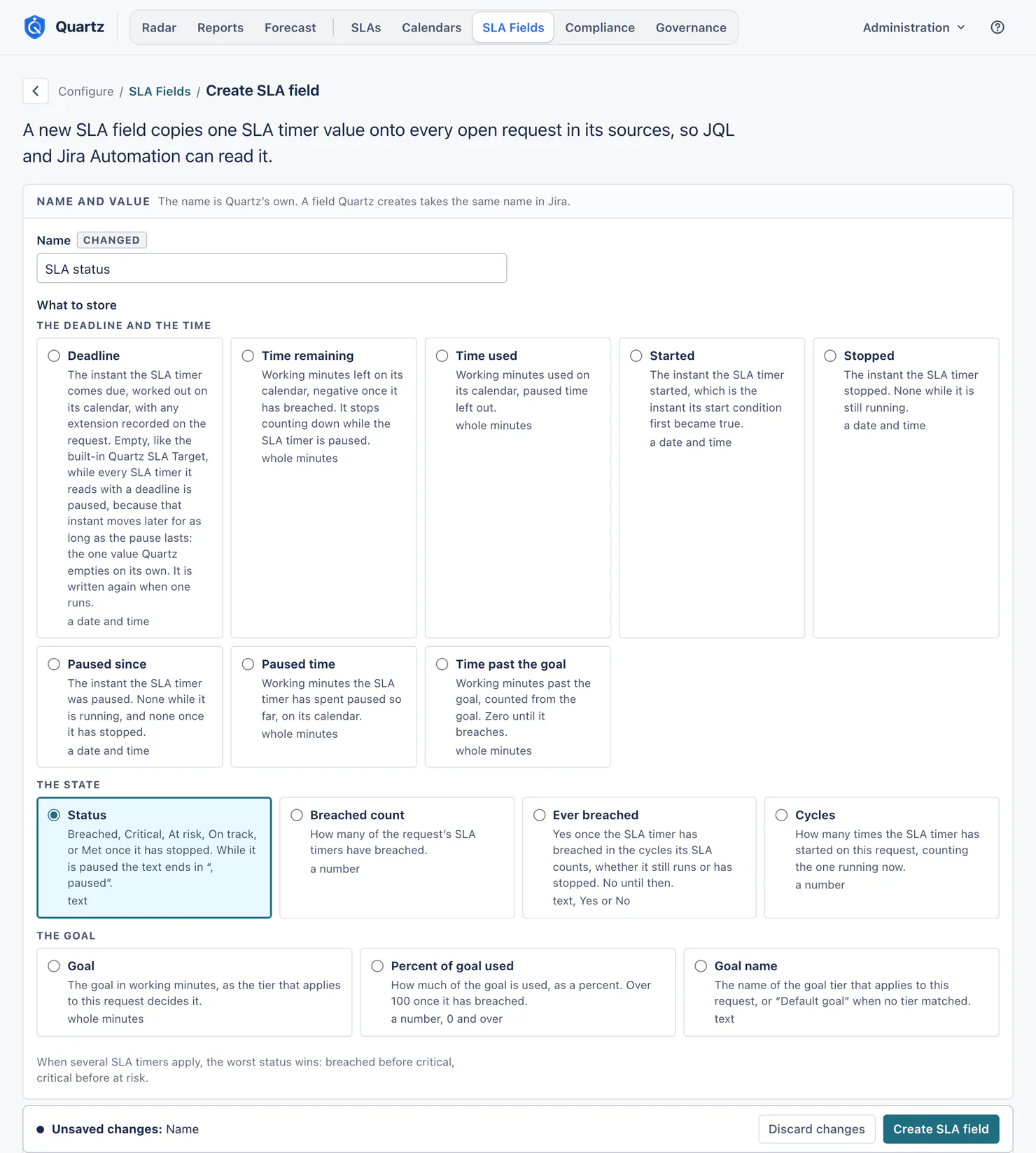
- Name. Quartz's own name; a field Quartz creates takes the same name in Jira.
- What to store. One of fifteen value types:
| Group | Value type | What it writes |
|---|---|---|
| The deadline and the time | Deadline (a date and time) | The instant the SLA timer comes due, worked out on its calendar, with any extension. Empty while the SLA timer is paused on a working-time goal, because that instant moves later for as long as the pause lasts; Quartz writes the new deadline when it runs again. A date goal keeps its date. |
| Time remaining (whole minutes) | Working minutes left, negative once it has breached. It stops counting down while the SLA timer is paused. | |
| Time used (whole minutes) | Working minutes used, paused time left out. | |
| Started, Stopped, Paused since (a date and time) | The instant the SLA timer started, stopped, or was paused. | |
| Paused time (whole minutes) | Working minutes the SLA timer has spent paused so far. | |
| Time past the goal (whole minutes) | Working minutes past the goal. Zero until it breaches. | |
| The state | Status (text) | Breached, Critical, At risk, On track, or Met once it has stopped; ", paused" while paused; Measuring and Measured for an SLA with no goal; No date set for a date goal whose date is empty. |
| Breached count (a number) | How many of the request's SLA timers have breached. | |
| Ever breached (text, Yes or No) | Yes when the SLA timer has breached, whether it still runs or has stopped. It reads the cycles the SLA counts: a breach before a reset, or in an earlier cycle of an SLA that counts the last cycle only, is not kept. | |
| Cycles (a number) | How many times the SLA timer has started on this request, counting the one running now. | |
| The goal | Goal (whole minutes) | The goal in working minutes, as the tier that applies to this request decides it. |
| Percent of goal used (a number) | How much of the goal is used, as a percent. Over 100 once it has breached. | |
| Goal name (text) | The name of the goal tier that applies, or "Default goal". |
When several SLA timers apply, the worst status wins: breached before critical, critical before at risk. On the SLA Fields page, the What gets written table says what each value type writes for a working-time goal, a date-field goal and an SLA with no goal.
- Update Time remaining, Update Time used, Update Paused time, Update Time past the goal or Update Percent of goal used: the card takes the name of the value type, and the other ten value types have no such card. See below.
- Source SLAs. Every enabled SLA (a date-field goal and an SLA that only measures are read too; a disabled SLA is not), or the SLAs you choose.
- Target Jira field. A field that already exists (one of your text, number, date or date-and-time custom fields, matching the value type), or A field Quartz creates (a global custom field named after this one; add it to your request screens for people to see it; where Jira lets Quartz write past the edit screen, JQL and Automation read it either way). If the SLA field then cannot be saved, Quartz moves the new Jira field to Jira's trash, so nothing is left behind.
Once written, it reads, in the Target Jira field card, shows how the value will look: it is an example, not a value from a request, since each request holds its own. Once the SLA field is saved with its Jira field, the box is headed In Jira it reads, and reads None while Jira holds no value in that field.
On the SLA Fields page, under What gets written, people who can change SLA fields see What (name) holds today, where the name is the first SLA field on the page (Status while there is none yet). It shows the value on up to five real requests you can browse, with the reason (a paused SLA timer, a JQL goal tier, an extension, an empty date, an SLA with no goal, a breach). When Quartz could not check which of those requests you can open (Jira's hourly limit for apps, or Jira did not answer), it says Not checked, why, and when the examples show, never that none of them is open.
Update Time remaining: steps
Every write is a Jira write, so a value that changes with time moves in steps:
- Automatic steps (the default): exact at every threshold the SLA sets, and exact at the goal. Between them the value moves every 5 working minutes while the next threshold is less than an hour away, every 15 minutes under 8 hours, every hour under 3 days, and once a working day beyond that. Past the goal it moves the same way, counted from the goal.
- Every 5 minutes, Every 15 minutes, Every hour: the same step throughout, on the SLA timer's own calendar, and still exact at each threshold and at the goal.
With automatic steps, a search on a threshold (at risk, critical, breached) turns true close to the moment the SLA timer reaches it. With a fixed step, "under 30 minutes left" turns true at the step, not at the minute. A smaller step is more writes on the same request; identical values are grouped, and every mapped field of one request goes in one write.
Field updates
How fields are updated:
- As requests change (the default): Quartz updates a field within about a minute of a change on the request, and moves values that change with time, like Time remaining, close to the moment they change.
- Every so often: Quartz writes field values on a schedule instead: every 5, 15 or 30 minutes, every hour, every 3, 6 or 12 hours, or once a day. The SLA timers themselves stay current either way.
The freshness line says how many values are up to date, how many wait and since when, and how many Jira refused, with Jira's own reason for each. When values wait because Jira's hourly limit for apps was reached, it says so and until when. See Limits and data retention.
Pause field updates stops writing into Jira until you resume. The SLA timers, Radar, Reports and the alerts keep running; only the writing into Jira stops. Nothing is lost: every value that changes while updates are paused is written when you resume. Pausing is recorded in the Audit log.
Update fields now runs the whole site to the end, with real progress counted in requests, and then says what it wrote, what was unchanged, what Jira refused and why, and any SLA whose JQL Jira would not run. When Jira refused every value the result reads Refused, and when it refused some, Partly written, with Jira's reasons below. Only one update runs at a time. Also write final values on requests resolved since a date writes the final value once on every request resolved on or after that date; a run without it writes open requests only. Measured on a test site: about 7 minutes for 3,000 requests. On Jira's shared limit for apps a large run can wait for the next hour once the site has spent three quarters of its share, and then goes on by itself (see Limits and data retention). The result also counts the values the run wrote into Quartz's four built-in fields ("Wrote 12 values on 12 requests, into Quartz's built-in fields."), so a run that changed only those never reads "Nothing to update".
What one update covers:
- A value is written only when it changed, and every value is the one Radar and the request panel show.
- Jira limits how much apps may read and write each hour. On a very busy site values can lag, and the freshness line shows what waits and until when.
- A field on no screen is still written. Quartz asks Jira to write past a field's edit screen, and past a status that does not allow edits, which Jira's documentation allows only for an app whose app user is a Jira admin. Where Jira takes it, the value is there for JQL and Jira Automation on every request, and a person sees it on a request only where the field is on a screen. Where Jira refuses, Quartz counts the requests and quotes Jira's own reason, and configuration health names the field.
- Where it can be written, on the SLA field's own page, names the projects whose edit screen lacks the field and says how a Jira admin puts it there by hand: in each project's settings, Screens names the edit screen the project uses; open that screen with Open screen settings and add the field to one of its tabs. Quartz does not ask for Jira's permission to change screens, so it never changes them itself.
- A field whose context does not include a project cannot be written there. The page names the projects, and a Jira admin can Extend the field's context to these projects from Quartz, or Open the field in Jira.
Final values. When a request is resolved, Quartz writes its final value once. Deadline, Time remaining and Time used are read from a running SLA timer, so they write nothing on a resolved request; every other value type has a final value. Quartz empties a value on its own in one case only: a Deadline while the SLA timers it reads are paused on a working-time goal (above). So "SLA deadline" < now() never finds a request only because it waits; the next write after the SLA timer runs again puts the new deadline back.
Deleting an SLA field
Delete asks first. Quartz stops writing the field; the values already in it stay as they are, on the requests the dialog counts, and go stale. Two choices:
- Clear the field on those requests first, so nothing stale is left behind. Clearing runs in the background.
- Move the Jira field to Jira's trash as well, for a field Quartz created. A Jira admin can restore it from the trash.
While the values are being cleared, the page shows how far it got:
- Stop clearing (for people who may change that SLA field) stops it once the requests it is clearing right now are done. The values already cleared stay cleared, the rest stay as they are, and the Jira field is not moved to the trash. The stop is recorded in the Audit log in the name of the person who stopped it, with how many requests were cleared and how many were left as they are.
- While field updates are paused, the clearing waits, and goes on when they resume.
- If another SLA field starts writing into the same Jira field, Quartz stops clearing, because those values now belong to that SLA field: "Another SLA field writes into this Jira field now, so Quartz stopped clearing its values. The values already cleared stay cleared, and the rest stay as they are."
After the upgrade to Quartz 5
- Status words. Breached, Critical, At risk, On track and Met are unchanged. An SLA that only measures now writes Measuring while it runs and Measured once it has stopped, and a date-field goal with no date writes No date set. A saved filter, queue or rule written on the old words (such as "Breached (late)" or "No target") needs a look. Values change as Quartz rewrites them in the background, so for a while a search can return a different set of requests.
- Field updates. An hourly setting became As requests change; 3, 6, 12 or 24 hours became Every so often at the same interval.
- Nothing written about the past. Reading your history after the upgrade writes no value on a resolved request, and writes a value on an open request only when it differs from what Jira already holds.
Related
- Automation recipes: rules and searches built on these fields.
- Settings: configuration health checks every SLA field.
Something unclear or wrong on this page? Contact support.