All documentation pages
The request panel
On every request an SLA covers, the Quartz SLA panel shows its SLA timers: where each one stands, when it is due, and why. Agents can extend an SLA timer or record an exception from it.
Everyone who can view the request in Jira. What they may change depends on their Quartz grants.
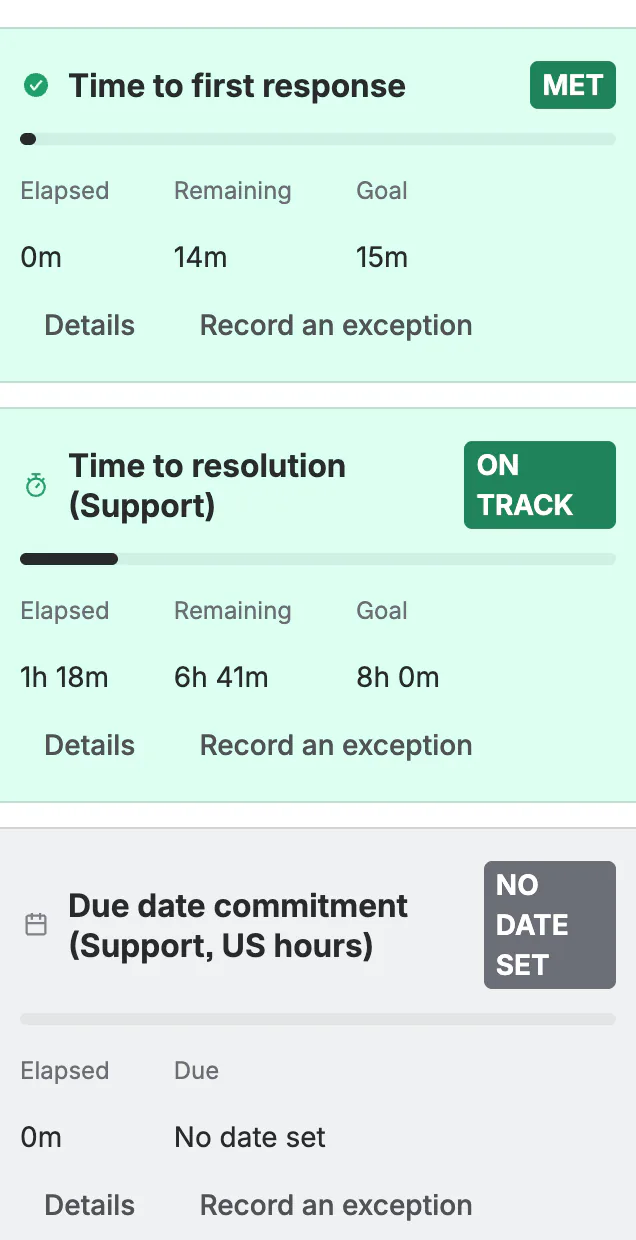
One tile per SLA
Each SLA that measures the request has a tile:
- The state: On track, At risk, Critical or Breached while it runs; Met or Breached once it stopped; Measuring or Measured for an SLA with no goal; No date set for a date goal whose date is empty; Not started; with ", paused" while it is paused. An SLA timer with an exception reads Excepted: "Excepted: left out of breach counts, Radar, Reports and SLA fields. The status above is for information only."
- The figure first: time Remaining (or Breached by, how long ago it breached), or Elapsed, as your site's timer display says.
- Goal, Due, Started, Paused since and Cycles, and the calendar it counts on. A goal from a goal tier, a tier's own calendar and an extension are all applied, exactly as Radar, Reports and the SLA fields apply them. Dates and times read as on every Quartz page ("26 Sep 2026, 10:06", or the time alone today).
- A paused SLA timer on a working-time goal has no fixed deadline while it waits: its time left holds still, and it reads "On track, paused" (or "At risk, paused", and so on).
- An extension reads "Includes a +2h extension on this request."
Details opens the tile with Why this status?: when the SLA timer started and which condition started it, what it waits for if it has not started, what pauses it now, and how much paused time was not counted. In it, Cycle breakdown opens the window SLA detail for that SLA:
- Starts / stops: the SLA's timer rules in words.
- Working cycles: each cycle's start, end and working time, read from the request itself when you open it.
- Paused, not counted: every pause.
- Result: the working time against the goal and the outcome.
- Explain in plain words (Advanced edition): a short explanation of this SLA timer, written from the same facts.
Extending an SLA timer
Extend this SLA timer, in Details (people granted Extend SLA timers, or Full configuration):
- by an amount of working time added to the goal, or to an amount of working time from now;
- a Reason (optional), at most 300 characters, or Reason when your site requires one.
Clear takes the extension back. An extension moves the deadline Quartz alerts on: if the SLA timer breaches its new deadline, Quartz mails once.
Recording an exception
Record an exception (people granted Record exceptions, or Full configuration) leaves the SLA timer out of breach counts, Radar, Reports and SLA fields.
- Ends on (optional): the exception holds through that day, and Quartz lifts it by itself at the end of it, in your site's time zone.
- A reason, as for an extension.
Lift the exception puts it back into every count.
Every extension and exception is recorded with who made it, when, from where and the reason given, if any. On the Advanced edition, Governance lists them. A site holds at most 50,000 exceptions at once.
Related SLAs
When the request has linked requests you can open, the panel lists them under Related SLAs with their worst state and time left; a breached one reads its time "past the goal". "More related requests you can open are not shown here." when there are more.
When no SLA applies
"No SLA applies to this request" lists the SLAs that were skipped, with the reason: disabled, or out of scope. People who can read that SLA's definition also see which part of its scope did not match (for example "Its JQL filter does not match this request."). People who can view Radar, or Reports for that SLA, see the plain reason only. Anyone else is not shown that SLA, and when no skipped SLA is left to show, the panel reads "No SLA covers this request."
Display options
People who can configure Quartz can change the site's timer display from the panel (Display options): the Time format and the Timer (Remaining or Elapsed). This is the same setting as Settings > Timer display, for everyone on the site.
How current the panel is
The panel reads Quartz's record of the request, which takes in a change within about a minute, and reads the request again itself when that record is behind. When it cannot read Jira again just now, the panel shows Quartz's last record with its time instead of an error, and says why: "As of 14:05. Jira's hourly limit for apps was reached, so this shows Quartz's last record of this request and reads it again after 15:00." The first words name the reason: Jira's hourly limit for apps was reached (Jira's own pool is spent), "Quartz is holding back because this site has used its share of Jira's hourly limit for apps", or "Quartz is keeping the rest of Jira's hourly limit for apps for more urgent work". When Quartz has no record of the request yet, or cannot read its working cycles for Cycle breakdown, for one of the same reasons, the panel says so and when to try again, for example "Quartz is holding back because this site has used its share of Jira's hourly limit for apps, so Quartz could not read this request just now. Try again after 15:00.", and never that no SLA applies. When Jira did not answer for any other reason, the panel reads "Jira did not answer just now. Try again in a minute.", never an error code. See Limits and data retention.
After the upgrade to Quartz 5
The panel speaks Quartz's words: "This SLA timer has not started yet.", "Breached by", "past the goal", "No SLA applies to this request", "Extend this SLA timer", and "Record an exception", "Lift the exception" and "Excepted" in place of the previous version's mute words.
Something unclear or wrong on this page? Contact support.