All documentation pages
Forecast
Forecast scores every open SLA timer against your own resolved history, so the ones likely to breach show before their countdown does.
Advanced. Forecast uses no AI: it is counted from your site's own recorded history.
Jira admins and people granted Full configuration. On the Standard edition, the page says what the Advanced edition adds.
What it shows
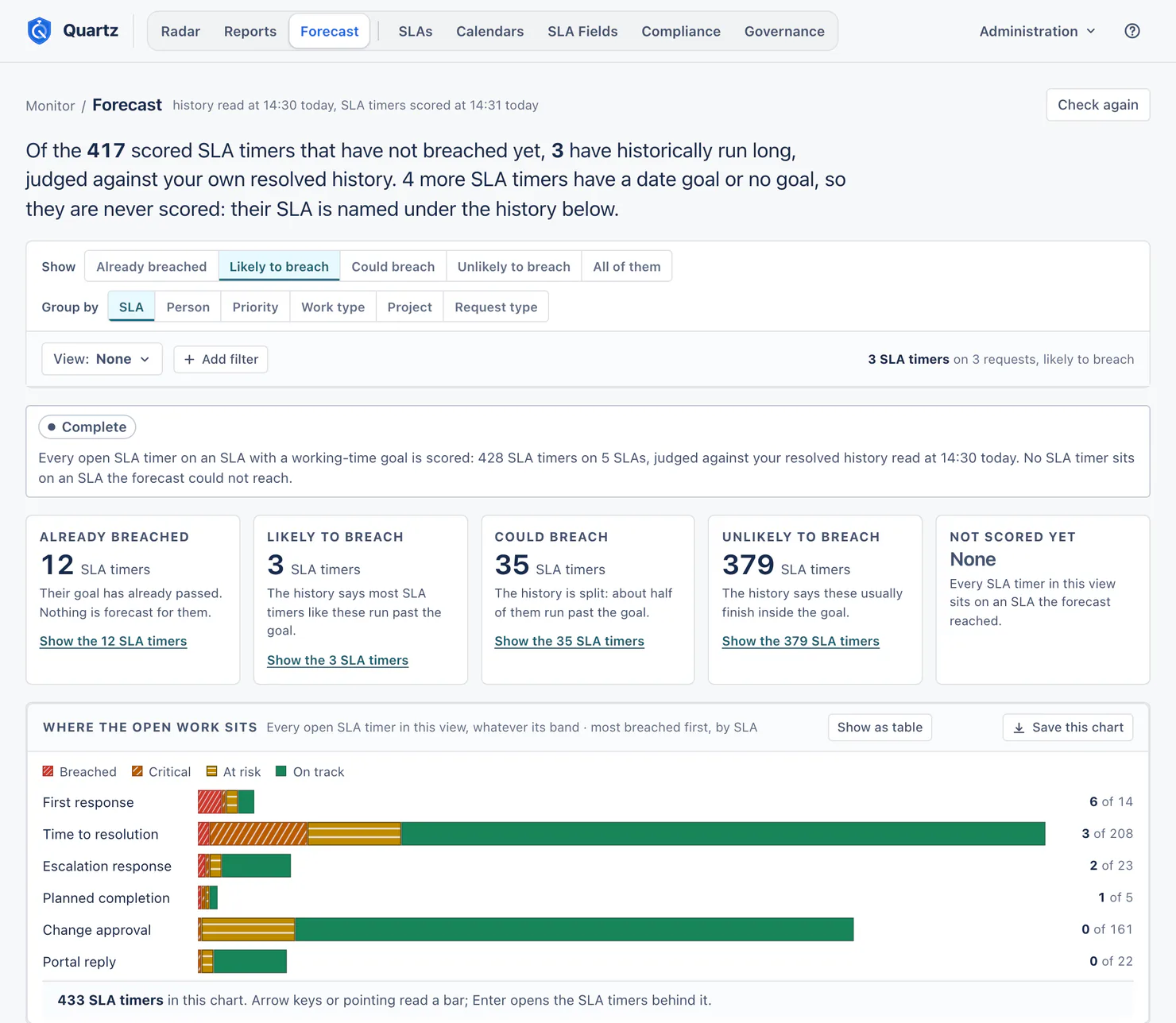
The page opens with one sentence, for example "Of the 417 scored SLA timers that have not breached yet, 3 have historically run long, judged against your own resolved history."
Show chooses a band:
| Band | Meaning |
|---|---|
| Already breached | Their goal has already passed. Nothing is forecast for them. This counts every breached SLA timer in the view, whatever its SLA's forecast, so it equals Radar's count. |
| Likely to breach | The history says most SLA timers like these run past the goal. |
| Could breach | The history is split: about half of them run past the goal. |
| Unlikely to breach | The history says these usually finish inside the goal. |
| All of them | Every open SLA timer in this view. |
A tile per band counts SLA timers and opens them. Not scored yet counts the open SLA timers the forecast could not score: on an SLA with no history to judge them against (nothing with a goal stopped on it in the last 365 days), on one Quartz is still reading, on one whose search Jira rejected, or started after the history was read (Check again scores those). The page names each such SLA under the history, with the reason. SLA timers on a date goal or with no goal are never scored, and the lead counts them apart.
Group by SLA, person, priority, work type, project or request type, and Add filter narrows the view. The chart Where the open work sits shows every open SLA timer in the view by state.
How a forecast is worked out
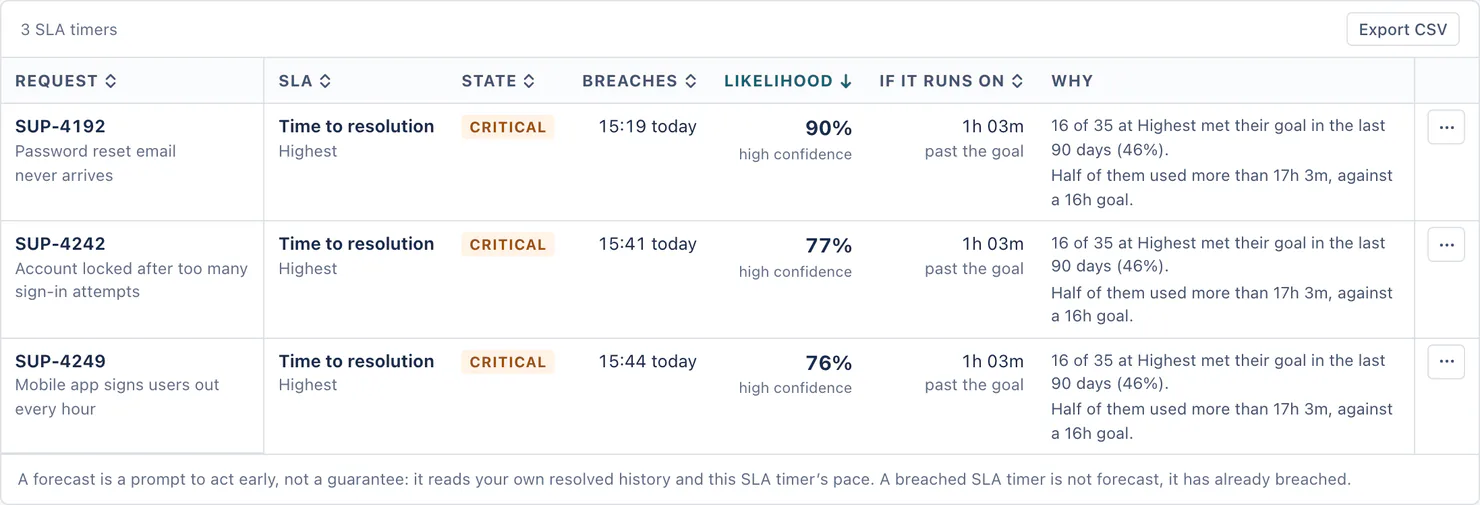
- A forecast compares one open SLA timer with the resolved SLA timers of its own SLA and priority (a cohort).
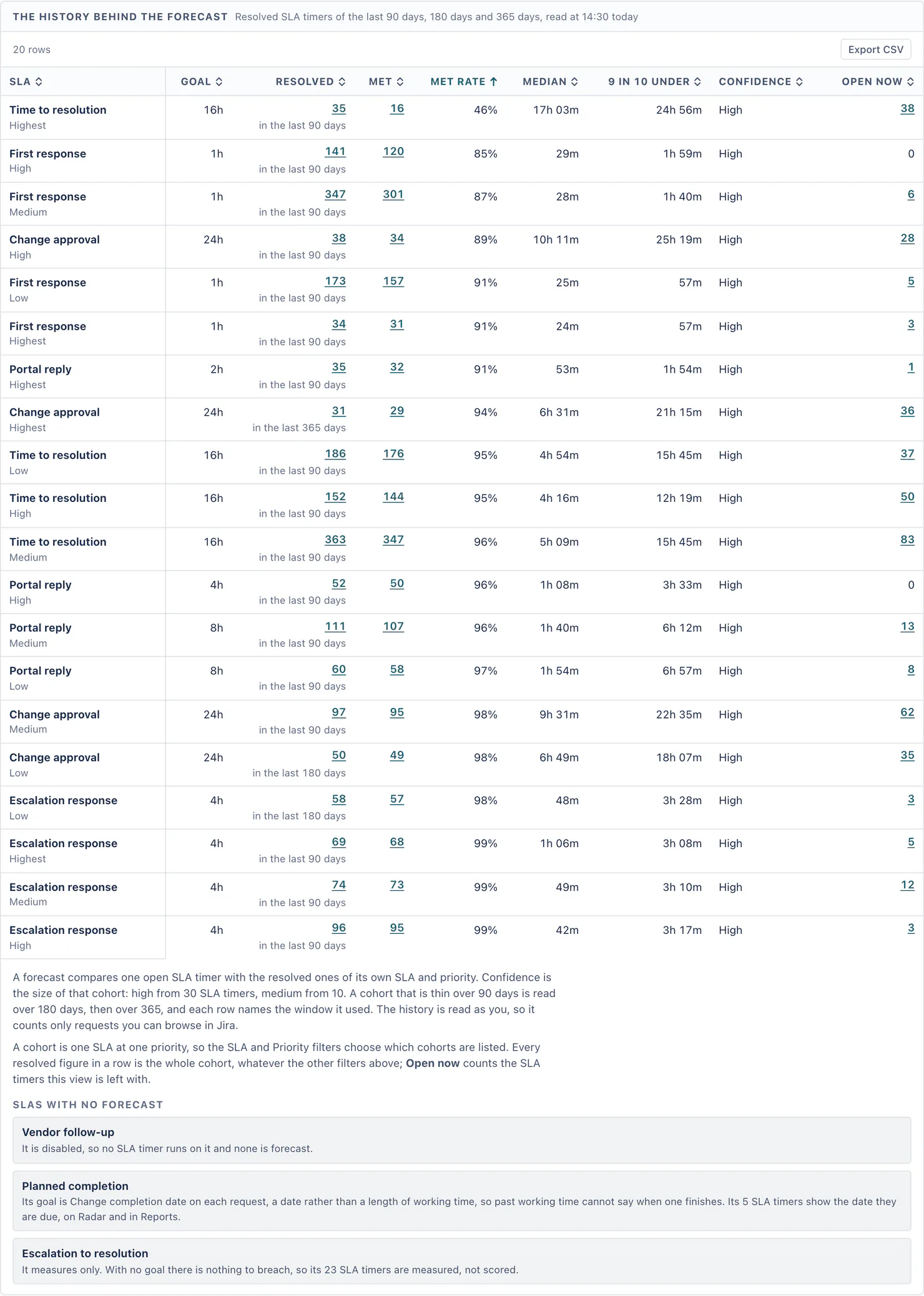
- Confidence is the size of that cohort: high from 30 SLA timers, medium from 10.
- A cohort that is thin over 90 days is read over 180 days, then over 365, and each row names the window it used ("58 resolved in the last 180 days").
- Each row of the table says when the SLA timer breaches, its likelihood, how far past the goal it would go if it runs on at the cohort's pace, and why, in plain figures: "16 of 35 at Highest met their goal in the last 90 days (46%). Half of them used more than 17h 3m, against a 16h goal."
- The history behind the forecast lists every cohort: its goal, how many resolved, how many met, the met rate, the median, the time nine in ten stayed under, the confidence and how many are open now.
A forecast is a prompt to act early, not a guarantee.
Forecast reads as you. Its history counts only requests you can browse in Jira, so two people can see different cohorts.
SLAs with no forecast
The page lists each SLA it cannot score, and why.
For example, an SLA has no forecast when:
- no SLA timer with a goal has stopped on it in the last 365 days, so there is no history;
- it is disabled;
- its goal is a date on the request, so past working time cannot say when one finishes (its SLA timers show their date on Radar and in Reports);
- it measures only, with no goal to breach.
Check again
Quartz scores every open SLA timer in the background and keeps the result, so opening the page reads the kept scores instead of scoring every SLA timer again. The times the history was read and the SLA timers were scored show at the top ("history read at 14:30 today, SLA timers scored at 14:31 today"). The first time, the page counts Already breached at once and bands the rest the moment the scoring finishes. Check again reads the history again in the background, scores every open SLA timer against it, and always finishes. While Quartz is still reading your site's history after an install or upgrade, the page says the forecast is based on what has been read so far. When the reading waits for Jira's hourly limit for apps, the page says why and shows what it has, as of when.
The kept scores take at most a tenth of what the site's database may hold. When a new scoring needs room, the scores viewed longest ago are removed first; a scoring that still does not fit is shown but not kept, and Quartz waits an hour before it scores in the background again, unless you choose Check again.
Measured on a test site with about 2,300 open requests (about 9,000 open SLA timers): Forecast opened in 8 to 23 seconds, Quartz scored all of them in about 8 seconds, Check again finished in about 18 seconds, and a page opened again while Quartz scored showed its progress, never an empty result.
Views and exports
Forecast views are saved, shared and linked like Reports views, and hold the band, grouping and filters. Each table has Export CSV, and the chart has Save this chart.
Radar's forecast line
On the Advanced edition, Radar's busiest-hour card can add the forecast for that hour's SLA timers ("Of these 31, 7 have historically run long."). Only people who can open Forecast see this line. Radar does not read the history itself: it uses the history the Forecast page checked for you, for at most ten minutes after you last used that page, so open Forecast first, then choose Re-scan on Radar. If you have not used Forecast in the last ten minutes, or none of that hour's SLA timers has historically run long, the card shows no forecast line.
Something unclear or wrong on this page? Contact support.