All documentation pages
Audit log and Governance
Two pages keep the record of what people did in Quartz. The Audit log lists changes to Quartz's configuration. Governance counts how extensions and exceptions were used on SLA timers, so compliance numbers stay trustworthy.
The Audit log
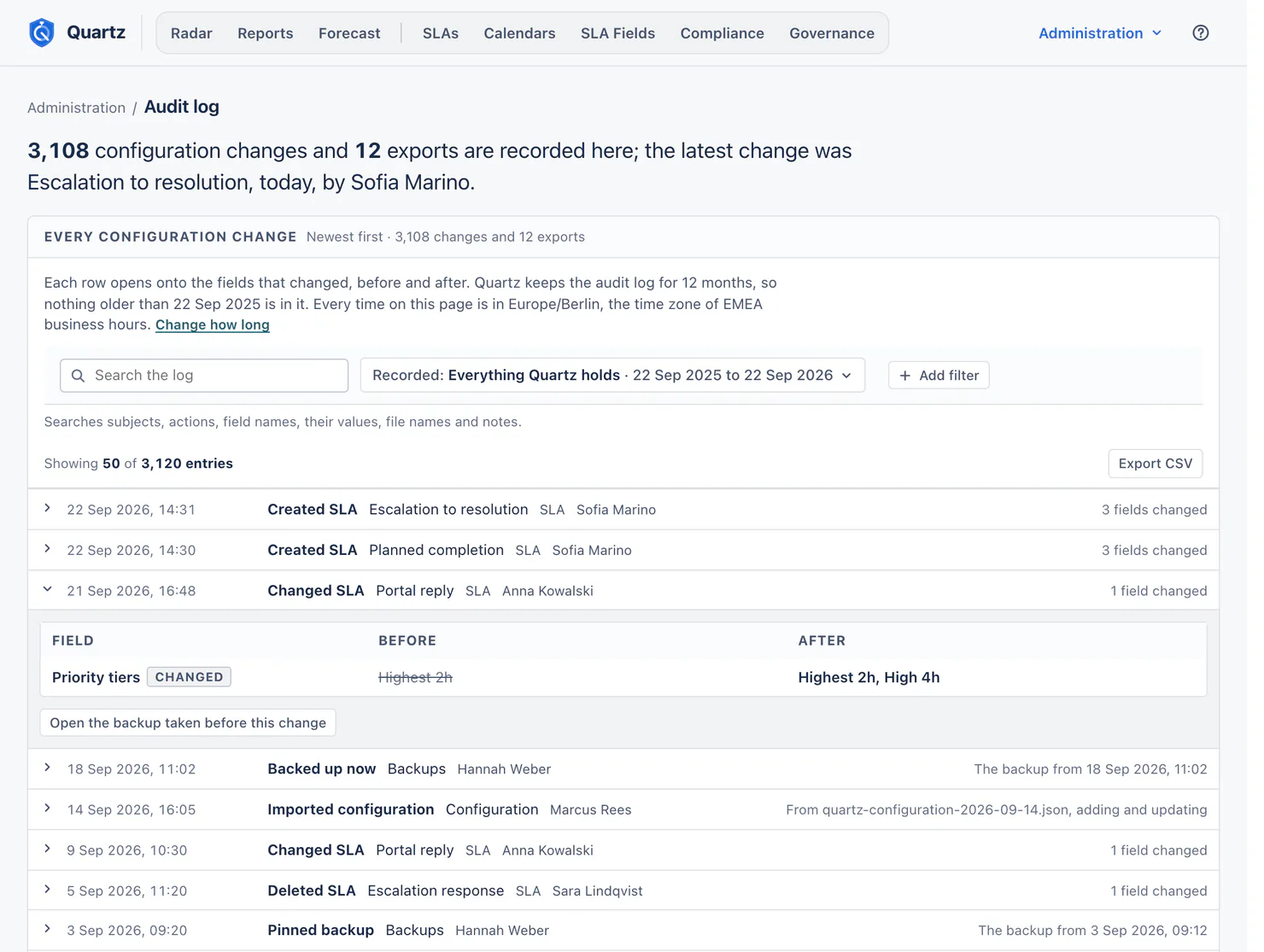
The Audit log lists every change to SLAs, calendars, fields, settings and permissions: who made it, when, and every field before and after.
Jira admins, and the people named on View the audit log in Permissions.
What is recorded
- Every change to an SLA, a calendar, a holiday scheme, a working-time scheme, an SLA field, an alert rule, a saved view shared with others, a permission and a setting: created, changed, enabled, disabled, deleted. A change someone makes to a report schedule is recorded when its saved view is shared with others or the schedule has recipients. A clearing of a deleted SLA field's values that someone stopped is recorded too ("Stopped clearing values"), with how many requests were cleared and how many were left as they are.
- Imports, restores, Back up now, pinned and unpinned backups, and downloads of the configuration file and of backups.
- Changes Quartz itself made while updating ("Updated Quartz"), for example when the Quartz 5 update rewrote how an SLA's reset is described.
Each row opens onto the fields that changed, before and after. For Jira admins and people who hold Export, import and backups, a row whose change Quartz backed up first also links to that backup (Open the backup taken before this change), while Quartz still holds it. Compliance controls are named as the Compliance page names them, by code and title; a control id Quartz does not know shows as stored, marked "(not mapped)".
Extensions and exceptions on single requests are in Governance, the alerts Quartz sent are in Settings under Alert rules, and field update runs are on SLA Fields.
Finding a change
- Search the audit log: searches subjects, actions, field names, their values, file names and notes.
- Recorded: a range, or everything Quartz holds.
- Add filter: Area, Action, Person (including Quartz itself, for updates and migrations) and Subject (an SLA, a calendar, a scheme, an SLA field or an alert rule, deleted ones included).
- The page shows 50 entries at a time, with Show 50 more, over the whole log.
Export
Export CSV writes every entry that matches the filters into one file, in the background. Anyone who can open the Audit log can export it, even where report downloads are limited, so an auditor can take the log away.
How long entries stay
Quartz keeps the audit log for Keep the audit log and extension records for (12 months by default; 3 to 84 months), set in Settings. The page says how far back it goes ("Quartz keeps the audit log for 12 months, so nothing older than 22 Sep 2025 is in it.") and offers Change how long.
Entries recorded by earlier versions of Quartz carried over at the upgrade to Quartz 5. Some of them did not record each field, and say so.
Governance
Governance counts how extensions and exceptions were used, and the patterns worth a second look. It changes nothing: it counts Quartz's own record, with the reason each person gave, and never request content.
Advanced. Governance uses no AI. Who can open it: Jira admins and people granted Full configuration.
What it shows
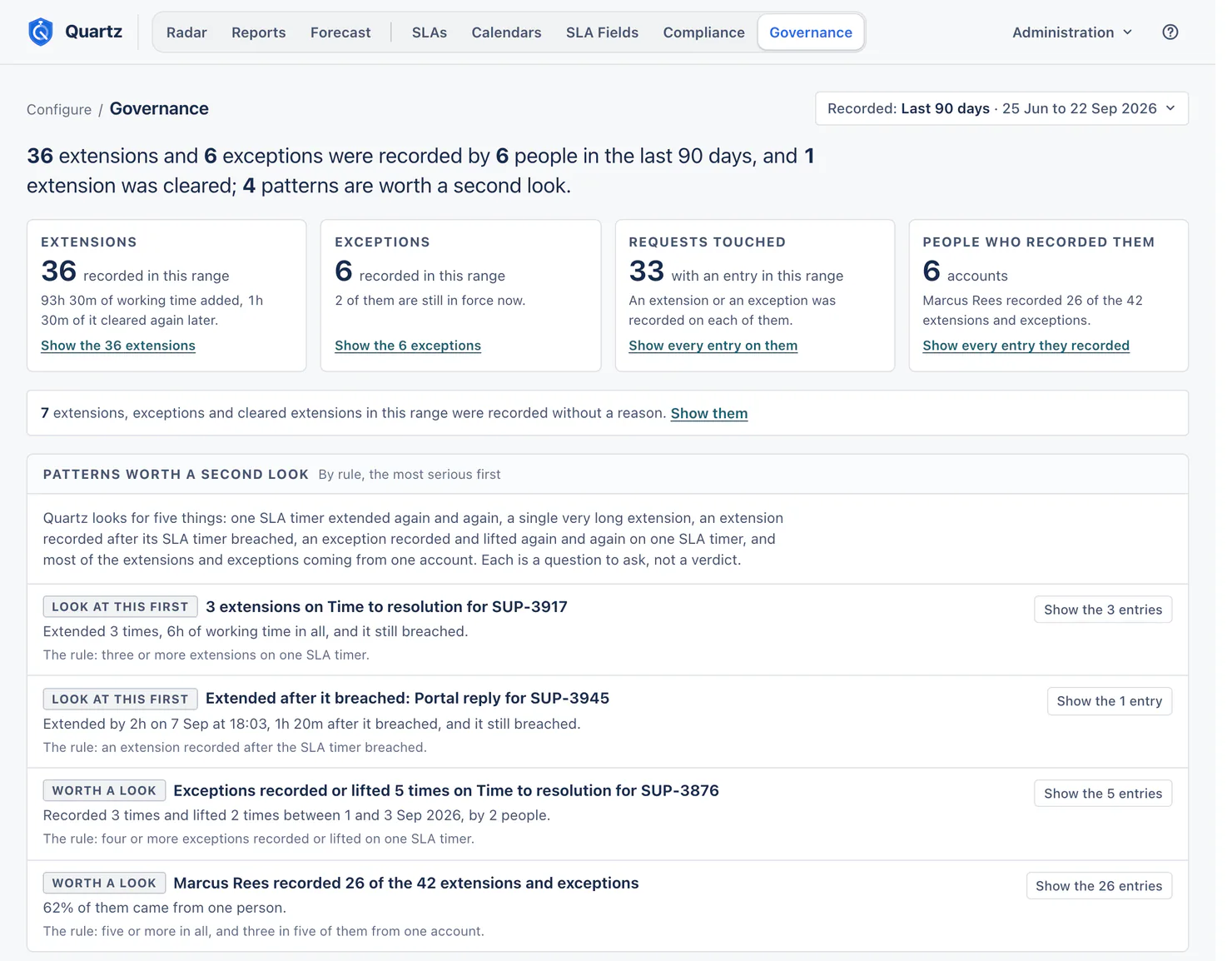
- Recorded: the range to read (Last 90 days by default). The lead sums it up, for example "36 extensions and 6 exceptions were recorded by 6 people in the last 90 days, and 1 extension was cleared; 4 patterns are worth a second look."
- Tiles: extensions (and the working time they added), exceptions (and how many are still in force), requests touched, and the people who recorded them. Each opens the entries behind it.
- No reason: how many extensions, exceptions and cleared extensions in the range were recorded without a reason, with Show them.
Patterns worth a second look
By rule, the most serious first. Each is a question to ask, not a verdict.
| Pattern | The rule |
|---|---|
| One SLA timer extended again and again | Three or more extensions on one SLA timer. It adds whether the SLA timer still breached. |
| A single very long extension | One extension of two working days or longer, on the SLA's own calendar. |
| An extension recorded after its SLA timer breached | An extension recorded after the SLA timer breached. Such an extension can turn a breach into met, and the pattern says when it did. |
| An exception recorded and lifted again and again | Four or more exceptions recorded or lifted on one SLA timer. |
| Most of them from one account | Five or more in all, and three in five of them from one account. |
Exceptions in force now
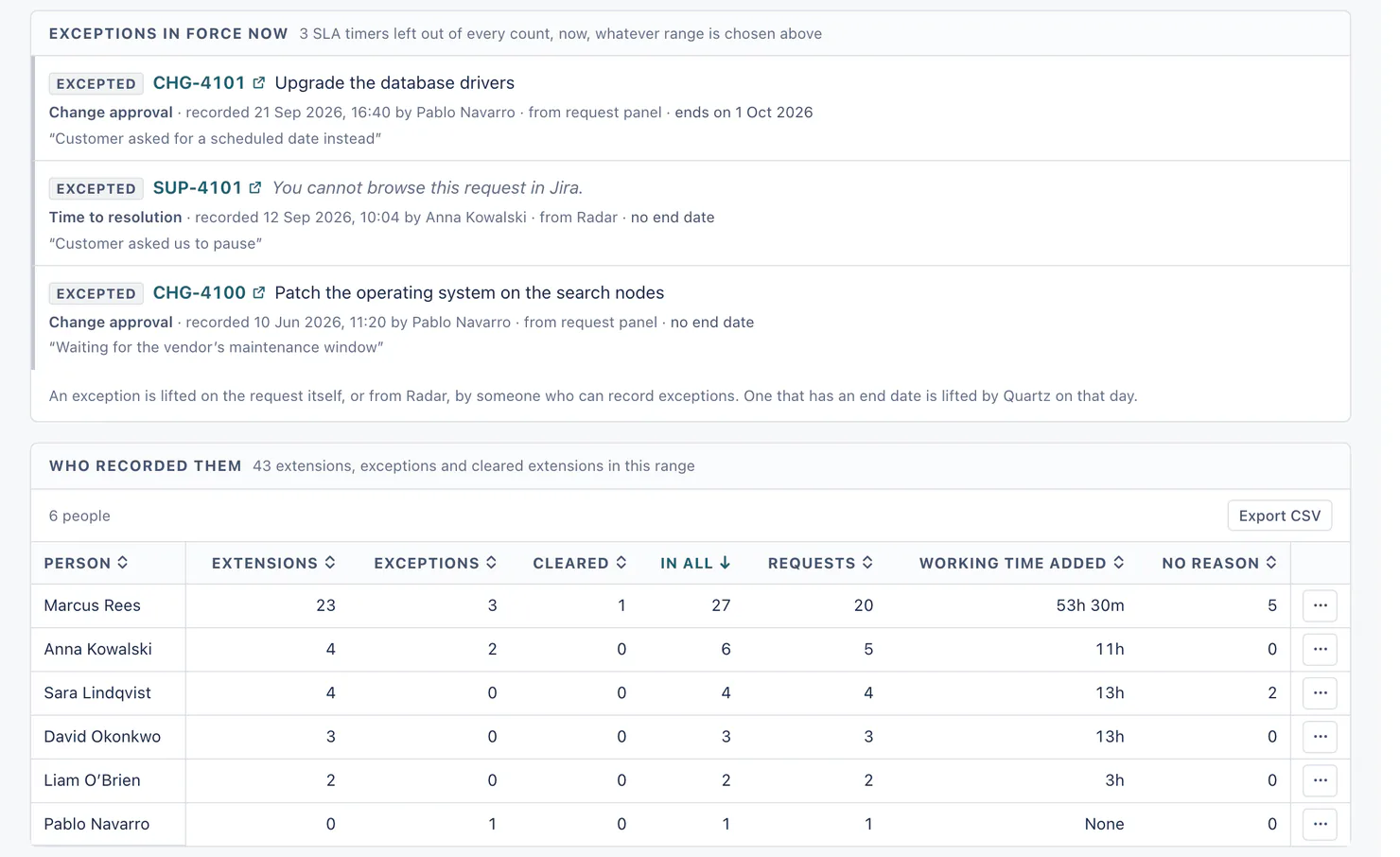
Every SLA timer left out of every count now, whatever range is chosen: the request, the SLA, who recorded it, when, from where (request panel or Radar), when it ends, and the reason. An exception is lifted on the request itself, or from Radar, by someone who can record exceptions; one that has an end date is lifted by Quartz on that day. A request you cannot browse shows its key without its summary ("You cannot browse this request in Jira.").
Who recorded them, and every entry
- Who recorded them: per person, extensions, exceptions, cleared extensions (Cleared), the requests they touched, the working time they added, and how many had no reason. In all counts all three, so No reason is never more than it.
- Every entry in this range: extensions, exceptions, lifts and extensions taken back, with the request, the SLA, who recorded it, the working time and the reason ("None given" when there was none). Add filter, including No reason given. An entry carried from before Quartz 5 may name no SLA, because the earlier request panel did not note it: its SLA reads "None · Recorded before Quartz 5, by a version that did not note the SLA".
- Export CSV on each table.
How long entries stay
Extension and exception records follow the same setting as the audit log: Keep the audit log and extension records for (12 months by default).
After the upgrade to Quartz 5
Extensions and exceptions recorded before Quartz 5 moved from the old audit log into Governance at the upgrade; an entry Radar made for several requests at once became one record for each request. Records written since the upgrade carry the reason each person gave.
Something unclear or wrong on this page? Contact support.